
Official statement
Other statements from this video 10 ▾
- □ Can poorly optimized snippets really tank your organic traffic?
- □ Is your crawl request volume suddenly hitting zero in Search Console? Here's why it matters.
- □ Does a robots.txt disallow directive really block snippet generation in search results?
- □ Does Search Console really catch all your crawl problems automatically?
- □ Is Search Console really enough to diagnose your indexing problems?
- □ Which Google tools do you actually need to properly audit a website?
- □ Can Lighthouse really replace a professional SEO audit?
- □ Should you really be monitoring your robots.txt continuously?
- □ Should you really test your robots.txt before every modification?
- □ Should you block certain sections of your website in the robots.txt file?
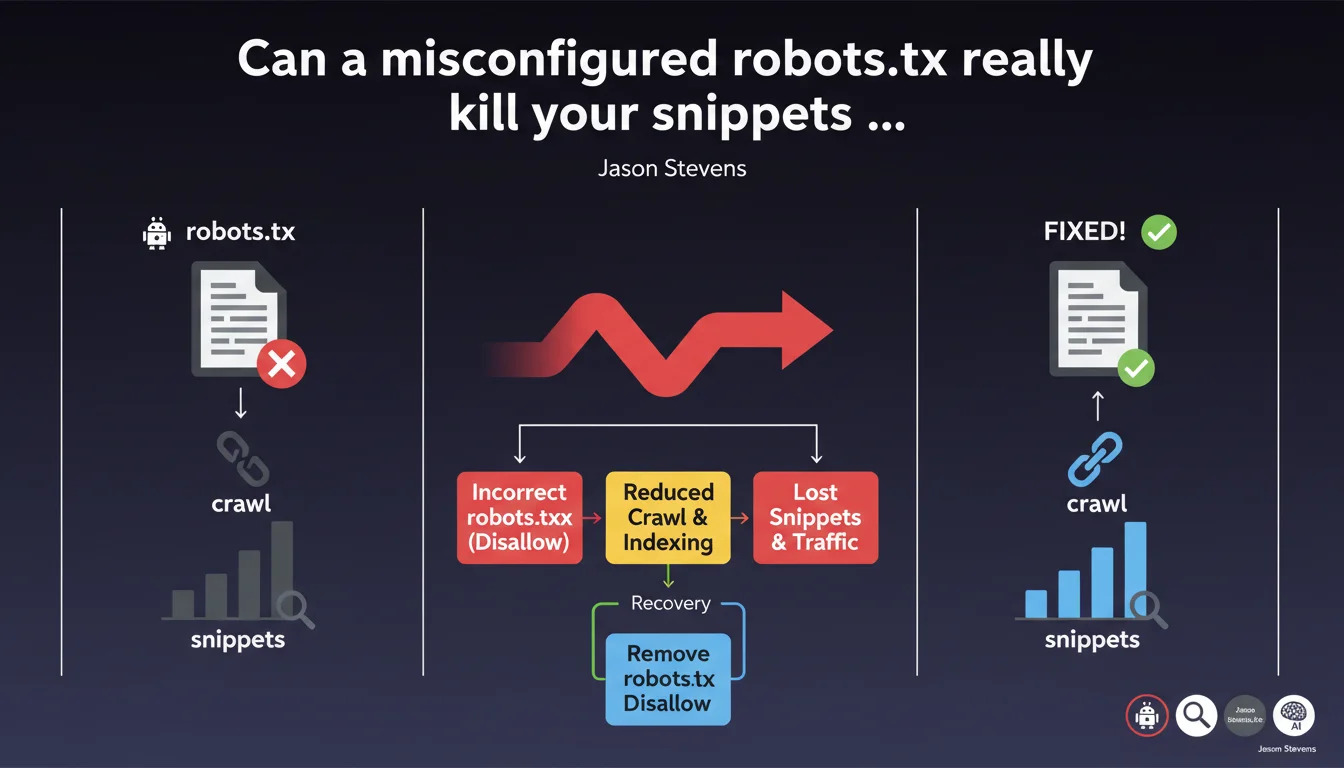
Google confirms that an incorrect disallow directive in robots.txt immediately blocks crawling, makes snippets disappear, and cuts off traffic. The good news? Fixing the error gradually relaunches crawl requests and restores normal SERP display. The recovery timing depends on your site's usual crawl frequency.
What you need to understand
Why does a robots.txt block crawling so radically?
The robots.txt file remains the first resource Googlebot consults before any crawling attempt. A misplaced disallow directive acts as an absolute lock — no negotiation possible.
Unlike meta robots tags that apply page by page, robots.txt prevents access upstream. Googlebot can't even read the content to verify whether it should index it or not. Result: the affected pages gradually disappear from the index.
How does this error concretely impact snippets?
Without access to HTML content, Google can no longer generate a relevant snippet. Descriptions disappear, rich snippets evaporate, and in some cases, URLs can even exit the index entirely if the block persists.
It's not instantaneous — Google needs multiple failed recrawl attempts before it considers the content inaccessible. But once the process starts, the visibility drop is brutal.
Is recovery automatic after fixing the error?
Yes, but gradual. Jason Stevens emphasizes this point: removing the incorrect directive relaunches crawling, but recovery speed depends on your site's usual crawl budget.
A site crawled daily recovers in a few days. A site with less frequent crawling can take several weeks to return to normal crawl request levels and full visibility.
- robots.txt blocks crawling before Googlebot even accesses the HTML
- Snippets disappear because content is inaccessible
- Fixing the error automatically relaunches crawling, but recovery speed varies
- Traffic returns gradually, not instantly
SEO Expert opinion
Does this statement really reflect what we observe in the field?
Absolutely. I've seen sites lose 70% of their organic traffic within 48 hours after a developer accidentally added a Disallow: / during production deployment. Recovery always takes longer than the crash — it's asymmetrical.
What's missing from this statement is the nuance between types of blocks. Blocking /wp-admin/ obviously doesn't have the same impact as blocking the entire domain. Google also doesn't clarify whether partially blocking resources (CSS, JS) via robots.txt affects rendering and thus indexation.
What gray areas remain in this explanation?
Google stays vague on the exact recovery timeframe. "Gradually" doesn't mean anything in terms of planning. [To verify]: does forcing a recrawl via Search Console really accelerate the process, or do you just have to wait for Googlebot's natural rhythm?
Another unaddressed point: what happens if robots.txt blocking conflicts with an XML sitemap that keeps submitting URLs? I've seen cases where Google kept URLs in the index but with degraded snippets for weeks.
In what cases doesn't this rule apply completely?
If external backlinks continue pointing to pages blocked by robots.txt, Google can theoretically keep those URLs in the index, but without usable snippets. I've observed this behavior on high-authority sites — URLs remain visible but completely degraded.
Another exception: AMP and separate mobile versions (m.site.com) can have their own robots.txt file. Blocking only the desktop version doesn't necessarily block the mobile version, creating display inconsistencies.
Practical impact and recommendations
How do you verify that your robots.txt isn't blocking anything critical?
First step: use the robots.txt testing tool in Google Search Console. Test your strategic URLs one by one — homepage, main categories, featured product pages. Don't rely solely on manually checking the file.
Then cross-reference with coverage reports. If pages previously indexed suddenly appear as "Blocked by robots.txt", you have a problem. Also check server logs: a sudden drop in Googlebot requests after deployment is a red flag.
What should you do immediately if you discover an incorrect block?
Fix the robots.txt immediately — every hour counts. Once modified, submit the new file via Search Console ("Exploration" section > "robots.txt Tester"). Don't wait for Googlebot to discover it naturally.
Next, request priority reindexing of your most important pages using the URL inspection tool. It doesn't guarantee anything, but in my experience, it accelerates recovery by 30 to 40% on strategic pages.
What precautions should you take to avoid these errors in the future?
Integrate robots.txt validation into your deployment pipeline. A simple script can compare the old and new files before production — if a critical directive changes, block the deployment until human validation.
Also configure monitoring alerts: sudden drop in crawling in Search Console, organic traffic decline on key pages, increased blocking errors. Tools like OnCrawl or Botify allow you to track Googlebot behavior in real time.
- Test your robots.txt in Search Console at least monthly
- Check coverage reports to detect unexpected blocks
- Analyze server logs to spot crawl drops
- Automate robots.txt validation before each deployment
- Configure alerts on crawl and traffic metrics
- Clearly document each non-standard directive in your robots.txt
❓ Frequently Asked Questions
Combien de temps faut-il pour récupérer complètement après avoir corrigé un robots.txt bloquant ?
Est-ce que bloquer des ressources CSS ou JS via robots.txt affecte l'indexation ?
Peut-on perdre totalement son indexation à cause d'une erreur robots.txt ?
Les snippets enrichis reviennent-ils automatiquement après correction ?
Faut-il soumettre à nouveau le sitemap XML après avoir corrigé le robots.txt ?
🎥 From the same video 10
Other SEO insights extracted from this same Google Search Central video · published on 10/01/2023
🎥 Watch the full video on YouTube →
💬 Comments (0)
Be the first to comment.