
Official statement
Other statements from this video 9 ▾
- □ Does user experience really impact SEO rankings, or just conversions?
- □ Is a high bounce rate really a red flag for your SEO performance?
- □ Is your SEO expertise blinding you to what your users actually need?
- □ Is your site losing traffic because of poor UX? Here's how to know when research is critical for SEO.
- □ Are your pages' negative ratings a hidden SEO signal worth investigating?
- □ Should you really start with heuristic evaluation before testing with real users?
- □ Why do five users truly unlock 85% of UX problems for SEO professionals?
- □ How can qualitative-quantitative triangulation transform your UX research into a powerful SEO lever?
- □ Why will 100 users never be enough to validate your SEO user experience strategy?
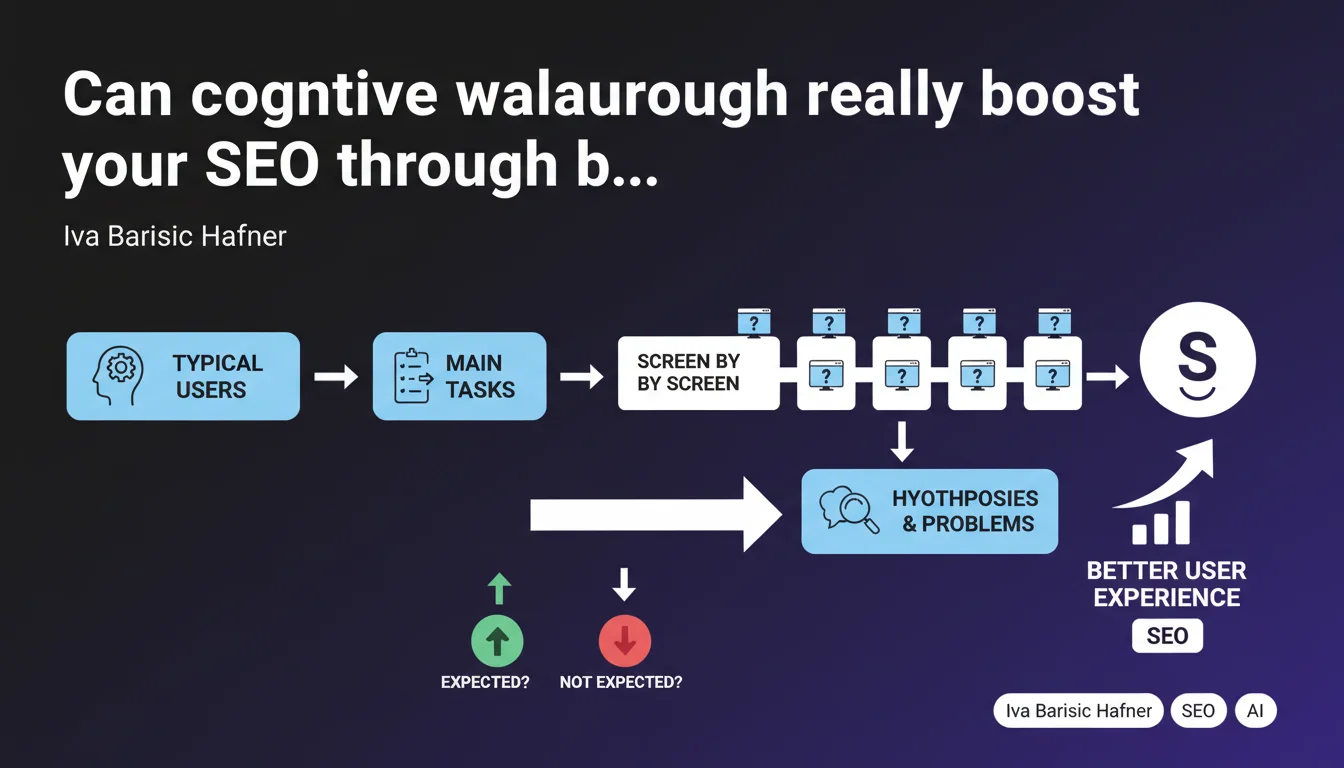
Google recommends cognitive walkthrough to identify friction points in the user journey. This method involves modeling typical users, mapping their priority tasks, then walking through the ideal path screen by screen to spot breaking points. The goal: anticipate UX problems that hurt behavioral signals.
What you need to understand
What exactly is cognitive walkthrough in practice?
The cognitive walkthrough is a UX evaluation methodology born in the 90s, brought back into fashion by Google. The principle: you put yourself in the shoes of a typical user and walk through their journey step by step on your site.
At each screen, you ask yourself a simple question — will the user naturally do what you expect them to do? If the answer isn't obvious, you note the hypothesis and document the potential friction point.
Why does Google talk about UX in an SEO context?
Because behavioral signals matter. A user who drops off, who goes back, or who leaves the site without accomplishing their objective sends a negative signal. Google doesn't explicitly say these signals influence ranking — but it's an open secret.
Cognitive walkthrough aims to limit abandonments and maximize engagement. A user who finds what they're looking for quickly stays longer, visits more pages, and generates positive signals.
What is Google's recommended methodology?
Three clear steps. First, you define your personas — not hollow marketing profiles, but real users with concrete needs. Next, you list their priority tasks: buy a product, download a guide, find technical information.
Finally, you walk through the ideal journey screen by screen. At each transition, you ask yourself if the user will understand the expected action and whether the interface naturally guides them. You accumulate a list of hypotheses to test and problems to fix.
- Model real typical users, not abstract marketing profiles
- Identify critical tasks that generate business value
- Walk through the ideal path step by step without skipping screens
- Note points where the user might hesitate or make a mistake
- Prioritize fixes based on business objective impact
SEO Expert opinion
Is this method really applicable in an SEO context?
Let's be honest: cognitive walkthrough is first and foremost a UX technique. Google recycles it in an SEO context because the two disciplines are converging. But beware — it's not a magic wand for ranking.
What's interesting is that this method lets you detect invisible friction that standard analysis misses. A high bounce rate or low time on page is a symptom. Cognitive walkthrough is the diagnosis.
What limitations should you keep in mind?
First limitation: this method relies on assumptions. You're not your user, and even with a good persona, you project your own logic. Real surprises often come from actual user testing — eye tracking, session recordings, A/B tests.
Second limitation: it takes time. On a large e-commerce site with 50 different journeys, you can't thoroughly examine everything. You need to prioritize pages with high traffic or those that convert poorly.
In what cases does this approach become counterproductive?
If you only assume without ever testing your hypotheses against reality, you risk fixing imaginary problems. A journey that seems confusing to you might work perfectly for your real audience.
Another trap: wanting to optimize excessively. A path that's too guided, too linear, can frustrate advanced users looking for a shortcut. Finding the right balance between simplicity and flexibility is the real challenge.
Practical impact and recommendations
How to apply cognitive walkthrough on your site?
First step: identify your top pages in terms of traffic and conversions. Next, for each one, list the 2-3 main actions the user must accomplish — for example: add to cart, download a PDF, fill out a form.
Then walk through the journey as if you were a user discovering the site for the first time. Don't cheat by clicking directly on the right button because you know where it is. Scan the page like a real visitor would.
What tools should you use to document detected friction?
A simple spreadsheet works fine. Create one column per screen, one row per question: does the user see the expected element? Is the label clear? Is the CTA visible? Is the next action obvious?
If you want to go further, tools like Hotjar, Clarity, or FullStory let you cross-reference your hypotheses with session recordings. You'll see where real users hesitate, click in the wrong place, or go back.
What mistakes should you avoid in implementation?
Don't focus only on visible pages. Conversion funnels, multi-step forms, and confirmation pages are often overlooked even though they concentrate abandonments.
Another mistake: fixing without prioritizing. Not all detected problems have the same business impact. Start with friction that blocks conversions, not cosmetic details.
- Map the critical journeys of your top pages
- Walk through each journey screen by screen without skipping steps
- Document each friction in a structured table
- Confront your hypotheses with real behavioral data
- Prioritize fixes based on conversion impact
- Test modifications with A/B tests before deployment
- Track the evolution of UX metrics post-fixes
❓ Frequently Asked Questions
Le cognitive walkthrough remplace-t-il les tests utilisateurs classiques ?
Combien de temps faut-il pour auditer un site avec cette méthode ?
Quels signaux comportementaux Google utilise-t-il pour évaluer l'UX ?
Faut-il appliquer cette méthode uniquement aux pages de conversion ?
Cette approche fonctionne-t-elle sur mobile autant que sur desktop ?
🎥 From the same video 9
Other SEO insights extracted from this same Google Search Central video · published on 31/10/2024
🎥 Watch the full video on YouTube →
💬 Comments (0)
Be the first to comment.