
Official statement
Other statements from this video 7 ▾
- □ Why can your website be completely invisible to Googlebot even though it displays perfectly in your browser?
- □ Is Googlebot really crawling your JavaScript content? Here's how to verify it
- □ Why Does Google Really Want You to Monitor Server Errors in Your Crawl Stats Report?
- □ Should you really panic about every single crawl error Google reports in Search Console?
- □ How can analyzing your server logs unlock hidden crawling insights and optimize Google's site exploration?
- □ How can you spot the real Googlebot among the imposters in your server logs?
- □ Why aren't your pages showing up in Google Search despite all your SEO efforts?
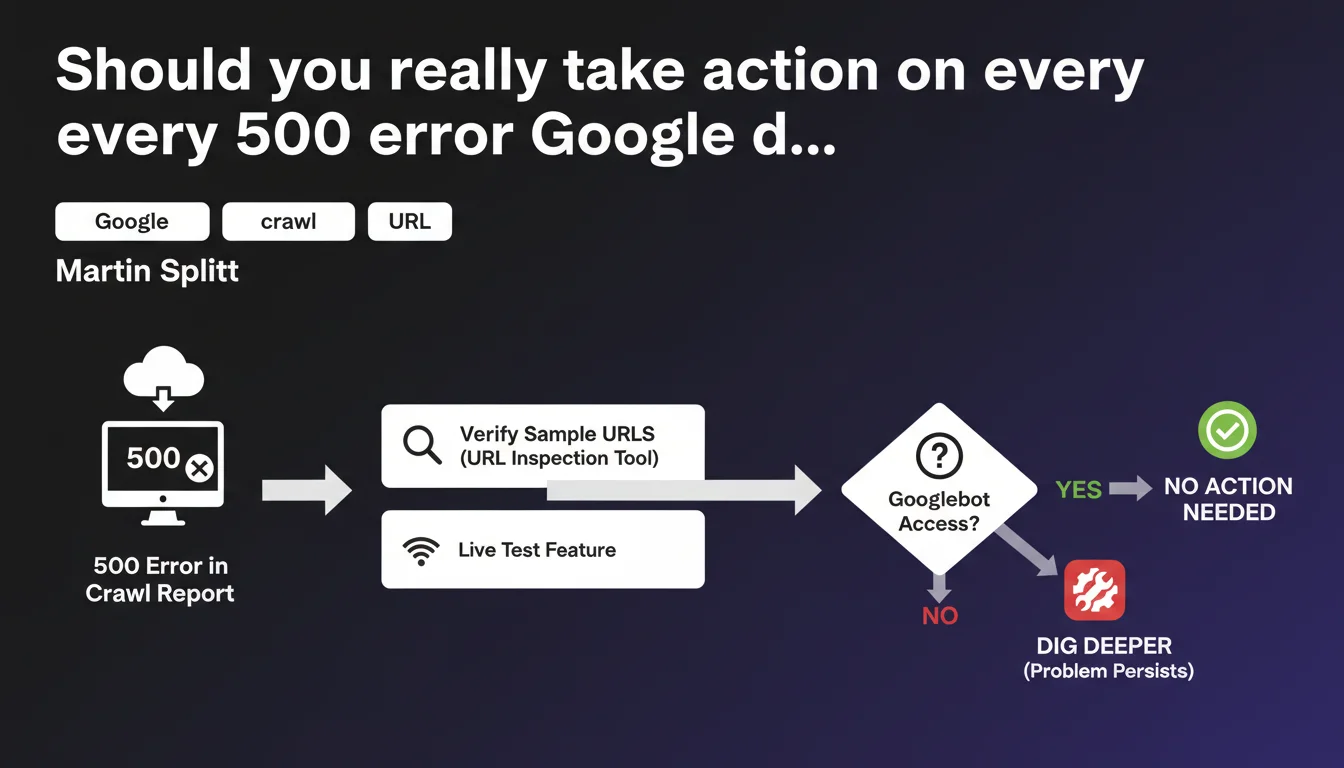
Google recommends testing error URLs (500, fetch failed) with the URL inspection tool's live test feature before taking any action. If Googlebot can access the URL during the test, the problem was temporary and requires no intervention. Only persistent errors deserve in-depth analysis.
What you need to understand
Why does Google insist on live testing rather than immediate fixes?
Because errors reported in your crawl report don't always reflect the current state of your pages. A server may have experienced temporary traffic spikes, brief maintenance, or isolated timeouts.
The live test sends an instant Googlebot request to verify if the problem still exists. If the URL responds correctly, it means the incident was isolated — Google will eventually re-crawl the page and update its status without any action on your part.
Which errors does this recommendation apply to?
Splitt explicitly mentions 500 errors (server errors) and fetch errors (timeouts, DNS, connection refused). These incidents can be transient.
404 errors, on the other hand, follow different logic: they typically signal permanently deleted content or malformed URLs. Live testing has little value for legitimate 404s.
What does "dig deeper" mean if the problem persists?
The inspection tool provides details on HTTP responses, headers, JavaScript rendering, and blocked resources. If the error recurs, you gain access to technical logs to identify the root cause.
Google isn't saying "fix everything immediately". It's saying: validate the problem's recurrence first, then act with solid data.
- 500 and fetch errors can be temporary — live testing prevents panicking over nothing
- If Googlebot accesses the URL during testing, no action is necessary — the crawler will naturally update the status
- The inspection tool delivers actionable technical logs for diagnosing persistent errors
- This approach saves time by prioritizing real issues over isolated incidents
SEO Expert opinion
Does this recommendation really change practices compared to current standards?
No, and that's precisely the issue. Splitt is reminding everyone of basic best practices that many SEOs still neglect: don't panic over every Search Console alert.
In the field, we see too many clients alarmed by a spike of 500 errors that correspond to a 10-minute maintenance window from three weeks ago. Live testing allows you to separate noise from genuine signals.
In which cases is the "wait and test" logic insufficient?
If you're seeing recurring 500 errors on high-traffic, strategic pages, waiting for Google to naturally re-crawl can cost you conversions. In this case, diagnose immediately — undersized servers, PHP timeouts, slow database queries.
Similarly, if a fetch error affects your entire URL set, you likely have a configuration issue (robots.txt, firewall blocking Googlebot, expired SSL certificate). Live testing will confirm the problem, but won't solve it alone. [To verify]: Google doesn't specify how long to wait before a temporary error disappears from the report — some observe latencies of several weeks.
What if live testing succeeds but the error reappears later?
You likely have intermittent server instability — traffic surges at certain times, random timeouts, failing CDN. Googlebot crawls at unpredictable moments; if your infrastructure is fragile, it will sometimes hit an error even if your manual test succeeds.
In this scenario, the real issue isn't detection but the robustness of your infrastructure. Increase server resources, optimize slow queries, or enable aggressive caching to absorb crawl spikes.
Practical impact and recommendations
Concretely, what routine should you adopt facing crawl report errors?
First step: open the crawl report, select a few representative URLs from each error type (500, timeout, DNS). Run a live test on each.
If Googlebot accesses the URLs without issue, ignore the alert — it will be cleared during the next full crawl. If the error recurs, move on to analyzing the logs and HTTP headers provided by the tool.
Which errors warrant immediate intervention?
Prioritize errors affecting high-value SEO pages: main categories, bestseller product pages, top-3 ranked content. If these pages return a 500, you're losing traffic — don't count on Google to re-crawl them quickly.
Errors on marginal URLs (old pagination, unnecessary sorting parameters, staging test pages) can wait. Focus your resources on what drives revenue.
How do you avoid drowning in false alarms?
Set up independent server monitoring (Uptime Robot, Pingdom, or continuously analyzed server logs) to detect real outages before Google reports them. If your monitoring shows nothing and Search Console screams, it's probably temporary.
Automate testing: some tools let you run live tests via Google's Inspection URL API. You can thus verify errors in bulk and filter out those already resolved.
- Live test error URLs before panicking — if Googlebot accesses them, the problem was temporary
- Prioritize errors on strategic pages: categories, bestseller products, top-3 content
- Set up independent server monitoring to cross-reference data with Search Console
- Automate live tests via API to handle large error volumes
- If an error persists, leverage technical logs from the inspection tool to diagnose (headers, rendering, blocked resources)
- Don't fix "just in case" — validate first that the problem is reproducible and current
❓ Frequently Asked Questions
Si le test en direct réussit, combien de temps avant que l'erreur disparaisse du rapport de crawl ?
Dois-je demander une ré-indexation après avoir corrigé une erreur 500 persistante ?
Les erreurs de fetch incluent-elles les timeouts JavaScript ou uniquement les erreurs réseau ?
Peut-on automatiser les tests en direct pour gagner du temps sur de gros volumes d'erreurs ?
Une erreur 500 temporaire peut-elle affecter durablement le classement d'une page ?
🎥 From the same video 7
Other SEO insights extracted from this same Google Search Central video · published on 13/12/2024
🎥 Watch the full video on YouTube →
💬 Comments (0)
Be the first to comment.