
Official statement
What you need to understand
Why Does Search Console Display Errors That Don't Seem Real?
Google uses two distinct systems to evaluate the mobile compatibility of your pages. The Search Console report relies on a large-scale algorithmic analysis that scans your entire site with automatic detection thresholds.
The mobile-friendly test, on the other hand, performs a one-time manual verification of a specific URL. This difference in methodology explains why certain pages may be flagged as errors in the console while they pass the individual test successfully.
What Causes These Discrepancies Between the Two Tools?
The automated Search Console reports apply strict tolerance thresholds that can vary depending on the analysis context. A page may come close to these limits without actually exceeding them during an individual test.
Factors such as touch target sizes, button spacing, or text readability are measured with different margins of error depending on the tool used. These minor variations generate false positives in global reports.
- Search Console analyzes in bulk with strict automatic thresholds
- The manual test evaluates a specific URL with greater precision
- Discrepancies often stem from borderline values near the thresholds
- These errors generally don't impact actual rankings
How Do You Know Which Information Source to Prioritize?
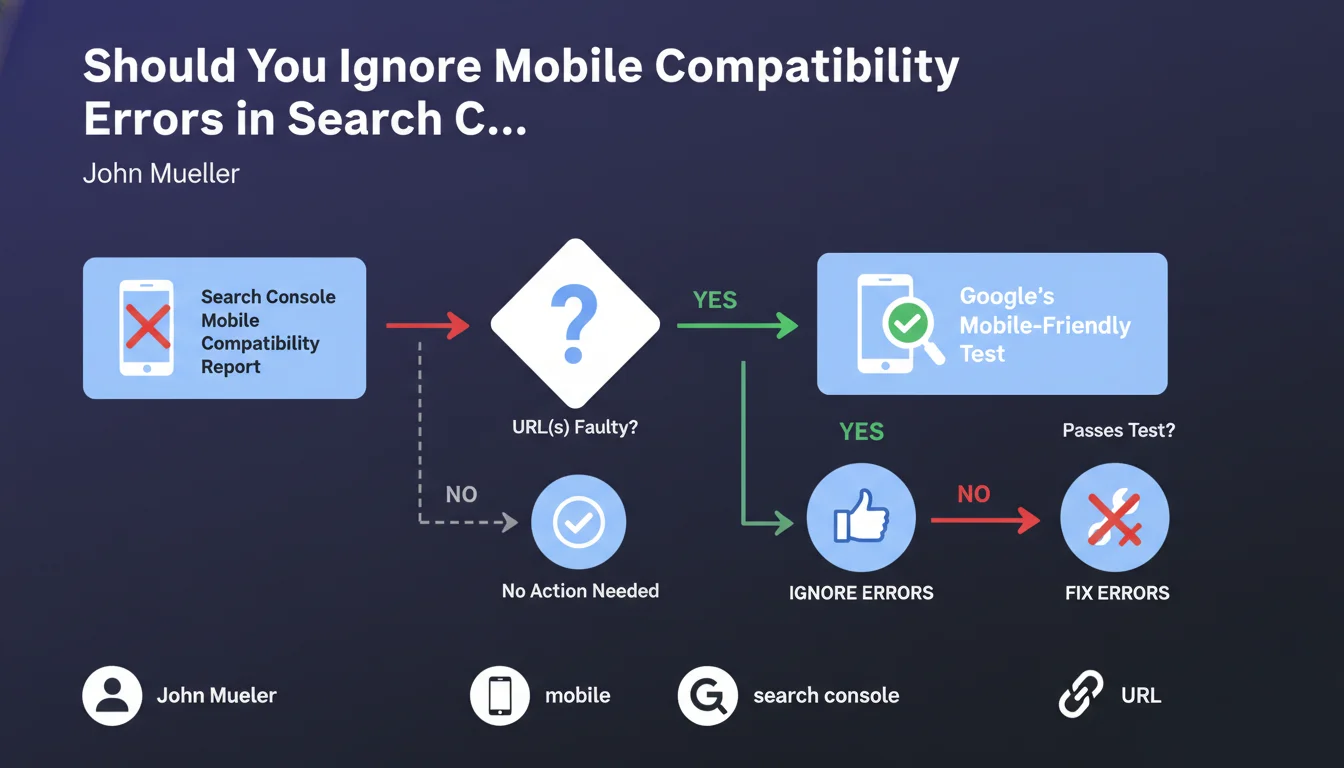
When a contradiction appears, the individual mobile-friendly test should be considered the reference. This tool performs a real-time crawl and precisely simulates the mobile user experience.
If this test validates your page, the error reported in Search Console likely stems from an automatic detection anomaly. Google confirms that it is legitimate to disregard it under these circumstances.
SEO Expert opinion
Is This Statement Consistent With Practices Observed in the Field?
Absolutely. For years, SEO professionals have regularly noticed these discrepancies between Search Console reports and manual tests. This official statement finally confirms what field experience had suggested.
Sites with numerous pages often display a few sporadic mobile compatibility errors without measurable impact on their mobile SERP performance. Crawl and ranking data generally show no correlation with these isolated alerts.
What Important Nuances Should Be Applied to This Recommendation?
Be careful though: this directive only applies if the manual test is genuinely positive. If your page also fails the mobile-friendly test, the error is real and must be corrected without delay.
Additionally, a massive volume of errors in Search Console, even with positive manual tests, may signal a deeper structural problem. It would be unwise to systematically ignore hundreds of alerts without thorough investigation.
In Which Cases Might This Rule Not Apply?
If you notice a drop in mobile traffic concurrent with the appearance of these errors, don't ignore them. Even if the manual test is positive, an investigation is warranted to identify potential user experience issues.
Similarly, if the errors concern your strategic high-traffic pages, a thorough manual verification remains recommended. The business stakes justify heightened vigilance, regardless of what the tools suggest.
Practical impact and recommendations
What Should You Concretely Do When Facing These Contradictory Errors?
Start by identifying the URLs flagged as errors in your Search Console's mobile compatibility report. Note their number and verify whether they're important pages for your SEO strategy.
For each problematic URL, perform a manual test via Google's Mobile-Friendly Test tool. If the result is positive and the page displays correctly, you can legitimately consider the error as non-blocking.
- Access the mobile compatibility report in Search Console
- List the URLs marked as problematic
- Test each URL via Google's Mobile-Friendly Test tool
- Document the results for each tested page
- Prioritize corrections only for genuine errors
What Mistakes Should You Avoid When Managing These Alerts?
Don't fall into the trap of over-optimization. Spending hours tracking phantom errors diverts your resources from truly priority SEO initiatives like content or Core Web Vitals.
Conversely, don't swing into total laxity. Quarterly error monitoring remains necessary to detect any real deterioration in your mobile compatibility that might otherwise go unnoticed.
How Can You Set Up Effective Monitoring Without Wasting Time?
Create a simple tracking spreadsheet listing persistent errors, with their manual test results and monthly evolution. This document will allow you to quickly identify genuine problematic trends.
Automate as much as possible by using the Search Console API to extract error data, then run batch tests on the affected URLs. This approach significantly reduces the manual time required.
- Configure automatic alerts for new massive errors
- Establish a monthly or quarterly verification routine
- Create a documented process for the technical team
- Archive test results for future reference
- Focus efforts on high business-impact pages
Discrepancies between the Search Console mobile compatibility report and the manual test are frequent and generally benign. Always prioritize the individual test result when a contradiction appears.
Implement a lightweight, regular verification process rather than trying to correct every automated alert. Focus your SEO resources on optimizations with measurable impact.
The methodical management of these technical reports, coupled with a global mobile strategy, can prove complex to orchestrate effectively. For high-stakes sites, support from a specialized SEO agency provides access to expert knowledge and advanced monitoring tools, ensuring your time is invested in optimizations that are truly priority for your visibility.
💬 Comments (0)
Be the first to comment.