
Official statement
Other statements from this video 7 ▾
- □ Pourquoi Google a-t-il besoin d'une équipe SEO dédiée pour son propre site ?
- □ Pourquoi les core updates de Google touchent-elles au cœur même de l'algorithme ?
- □ Comment Google départage-t-il vraiment les avis produits de qualité ?
- □ Faut-il vraiment réagir vite après une mise à jour algorithmique de Google ?
- □ Faut-il vraiment s'inquiéter si votre page d'accueil n'a pas de H1 ?
- □ Pourquoi Google refuse-t-il de fixer une date finale pour l'indexation mobile-first ?
- □ Faut-il paniquer quand Google Search Console signale des erreurs de redirection ?
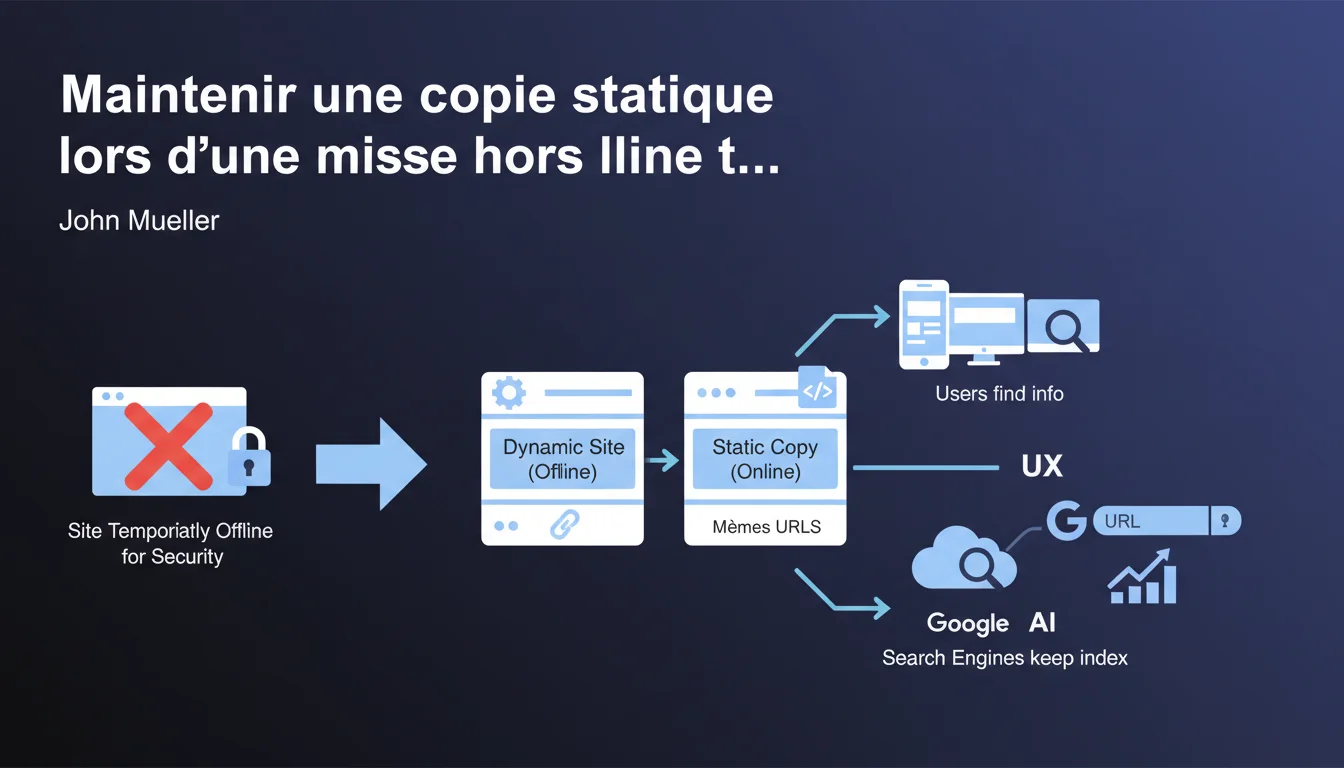
Google recommends keeping a static copy of the site with the same URLs during temporary downtime for security reasons. This approach helps preserve indexing and prevents massive deindexing that could take weeks to recover. A simple yet often overlooked solution that can save months of SEO work.
What you need to understand
If a site needs to be taken offline urgently — due to a security breach, an ongoing attack, or a critical issue — the first reaction is often to shut everything down. Fatal mistake. Google continues to crawl, URLs return 503 or 404 errors, and indexing goes haywire.
Why does Google insist on keeping the same URLs?
The continuity of URLs is critical. If you change your URLs during downtime, Google must relearn everything: structure, hierarchy, page authority. A static copy on the same paths signals to the engine that the site still exists and that there hasn’t been a wild redesign.
Bots continue to see valid content, even if static. There’s no panic on the crawl side, no massive deindexing. The index remains stable.
What do we mean by a "static copy" in practical terms?
A pure HTML version, with no active database, no server-side scripts. The pages are pre-generated and served directly. There’s no risk of the attacker exploiting a PHP or SQL vulnerability if everything is hard-coded.
Technically, this could be a snapshot generated by an internal scraping tool, a frozen Varnish cache, or an exported version via a static site generator. The essential point: each URL must respond with a 200 with consistent HTML content.
What happens if we don’t maintain this copy?
The URLs become inaccessible. Google receives repeated server errors. After a few days, the index begins to empty — pages deemed "dead" gradually disappear from the SERPs.
Once the site is back online, it can take several weeks to recover the initial positions. The engine must recrawl, reevaluate, and redistribute authority. That’s a lot of lost time and sharply declining organic traffic.
- Keeping the URLs unchanged avoids massive deindexing and preserves the site’s architecture in Google’s eyes.
- A static copy protects against flaw exploitations while remaining visible to the bots.
- Without this precaution, post-incident recovery can take several weeks or even months.
- Users continue to find information, even if static, rather than hitting a frustrating error page.
SEO Expert opinion
Is this recommendation really implemented in the field?
Let’s be honest: very few sites have a static copy procedure ready to deploy in a crisis. Most IT teams simply shut everything down, put up a generic maintenance page, and focus on resolving the security issue.
SEO isn’t the priority when the server is on fire. The result: indexing suffers, and the damage is discovered two weeks later when organic traffic has dropped by 60%. [To be confirmed]: Google does not specify how long it tolerates a static copy before considering the content obsolete or penalizing for internal duplication if dynamic versions reappear inconsistently.
What risks does this approach pose?
A static copy stuck for too long can send contradictory signals. If your e-commerce site displays stocks, prices, promotions — and everything remains frozen for 10 days — the user experience degrades. Google detects an abnormal bounce rate and ultra-short sessions.
Another pitfall: the static copy must include navigation elements, internal linking, and coherent canonical tags. If it’s generated in a rush, it can introduce internal dead links or structural inconsistencies that disrupt crawling.
In what cases does this rule not apply?
If your site relies entirely on dynamically generated content — social feeds, real-time dashboards, SaaS applications — a static copy makes no sense. Users will encounter blank screens or outdated data, which can be more damaging than a simple maintenance page.
In these contexts, it’s better to have a clean maintenance page with a 503 code and a well-configured Retry-After header. Google will then know to come back later without deindexing immediately.
Practical impact and recommendations
What should be implemented before a crisis?
The key is anticipation. Waiting for the incident to improvise a static copy is already too late. You need an automated process that regularly generates a snapshot of the site — for example, via an internal scraping script or an export from the CMS.
This snapshot should be hosted on an isolated infrastructure, ideally a CDN or a distinct static server. In case of trouble on the main server, a simple DNS switch or a load balancer redirect is enough to serve the static version.
How to verify that the static copy is SEO-friendly?
Test the static copy before it goes live. Crawl it with Screaming Frog or a similar tool: all URLs must respond with a 200, meta tags must be present, and internal links must point to existing pages in the copy.
Also check the response times. A static copy should be ultra-fast — if it takes 2 seconds to load, something is wrong with generation or hosting.
What mistakes should be absolutely avoided?
Do not serve a static copy with a 503 code. Google will interpret that as temporary maintenance and will wait for the return of the dynamic version. However, you want the engine to index the copy, not to wait.
Another trap: forgetting to disable forms, shopping carts, login areas. If a user tries to log in or place an order on a static copy, the experience will be disastrous. It’s better to hide these elements or display a clear message.
- Establish an automated process for static copy generation (weekly or daily depending on site update frequency).
- Host this copy on an isolated infrastructure (CDN, distinct static server) to ensure availability in case the main server is compromised.
- Test the static copy with a crawler to check for URL coherence, tags, and internal links.
- Configure a quick DNS switch or load balancer to activate the copy in just a few minutes.
- Disable or hide interactive features (forms, carts, logins) in the static version.
- Document the switching procedure and train IT/Ops teams so they can act without the SEO on hand.
- Prepare a user communication plan (banner, pop-up) explaining that the site is in a degraded temporary mode.
❓ Frequently Asked Questions
Combien de temps peut-on maintenir une copie statique sans impact SEO négatif ?
Faut-il ajouter un code 503 ou laisser les pages en 200 avec la copie statique ?
Peut-on utiliser une version cache ou CDN comme copie statique ?
Que faire si la copie statique contient du contenu sensible ou obsolète ?
Comment informer Google qu'on bascule sur une copie statique temporaire ?
🎥 From the same video 7
Other SEO insights extracted from this same Google Search Central video · published on 23/12/2021
🎥 Watch the full video on YouTube →
💬 Comments (0)
Be the first to comment.