
Official statement
Other statements from this video 2 ▾
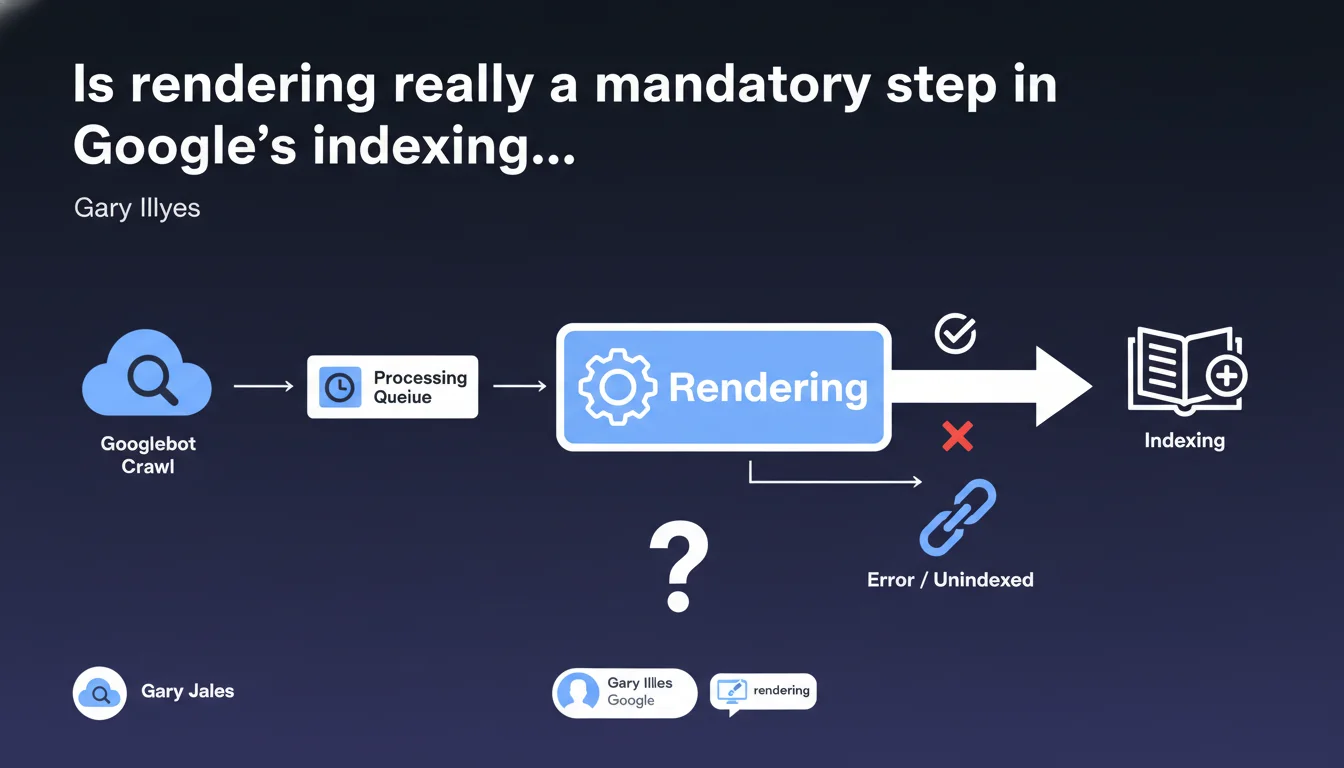
Google confirms that rendering (JavaScript execution) is an integral part of the indexing process, not an optional or secondary step. In practical terms: if your critical content depends on JS to display, it necessarily goes through the rendering phase before being indexed. This directly impacts the speed and quality of your pages' indexing.
What you need to understand
Why does Google insist on this distinction?
Because too many SEOs still treat rendering as a separate process, a kind of technical bonus that happens after indexing. That's wrong.
Rendering isn't a post-indexation verification. It's a mandatory step that sits between the initial crawl and final indexation. If Google can't render your page correctly, it can't index it correctly either.
What does this change for a modern JavaScript site?
For sites that generate their content on the client side (React, Vue, Angular), it means every crawled page must go through Google's rendering engine — which executes the JavaScript before processing the final DOM.
This isn't instantaneous. Rendering consumes resources on Google's side, which introduces a time delay between crawl and indexation. Sometimes a few hours, sometimes several days for sites with low crawl budget.
Do all contents go through this step?
No. If your raw HTML already contains all essential content (Server-Side Rendering, static HTML), Google can index directly without heavy rendering.
But as soon as it detects dynamically loaded content — title tags modified in JS, injected text, generated links — it must obligatorily render the page to process these elements.
- Rendering is a mandatory phase in the indexation pipeline, not an option
- It sits between the initial crawl and final content indexation
- JavaScript-heavy sites are systematically subjected to rendering
- This process introduces a delay that can slow down indexation
- Static HTML or SSR partially bypasses this step
SEO Expert opinion
Does this statement contradict on-the-ground observations?
No, it confirms them. We've observed for years that full-JS sites are indexed slower than sites with content in raw HTML. Gary Illyes is simply formalizing what we observe empirically.
However — and this is where it gets tricky — Google remains completely vague about timelines. How long between crawl and actual rendering? No public data. We only know it can take "some time", which in practice could mean 10 minutes or 10 days depending on your crawl budget. [To verify]
Is rendering really as reliable as claimed?
Let's be honest: no. Google's rendering engine (based on Chromium) is decent, but not infallible. It doesn't support all recent JavaScript APIs, it can fail on sites with aggressive timeouts, and it doesn't always execute user events (scroll, click) that trigger lazy-loading.
In short, Google tries to render your page like a modern browser, but there are gaps in the system. If your critical content requires user interaction to display, you're in a gray area. [To verify]
Why doesn't Google render all pages immediately?
Because rendering is expensive in terms of resources. Executing JavaScript at scale for billions of pages consumes CPU, RAM, and time. Google therefore prioritizes: important pages (high crawl budget, strong authority) go through rendering quickly, others wait in queue.
That's why a new or low-authority site will see its JS pages indexed much slower than an established site. Rendering follows the same prioritization logic as crawling.
Practical impact and recommendations
What should you do concretely to optimize rendering?
First, reduce JavaScript dependency for critical content. Anything that needs to be indexed quickly — titles, main text, internal links — should ideally be present in the initial HTML, before JS execution.
If you're using a modern JS framework, implement Server-Side Rendering (SSR) or static generation (SSG). Next.js, Nuxt, SvelteKit allow you to pre-render HTML on the server side, which drastically speeds up indexation.
Next, regularly test your pages with Google's Mobile-Friendly Test tool (which displays the rendered DOM) and Search Console (inspect the URL to see the processed HTML). Never rely solely on raw source code.
- Serve essential content (title, H1, main text) in raw HTML, before any JS
- Implement SSR or SSG for JavaScript-heavy sites
- Limit blocking resources (heavy scripts, unnecessary polyfills) that slow down rendering
- Avoid short timeouts that prevent Google from completing rendering
- Systematically test rendering via the URL inspection tool in Search Console
- Monitor indexation in GSC: a significant gap between crawled and indexed pages may indicate a rendering issue
❓ Frequently Asked Questions
Le rendering ralentit-il l'indexation de toutes les pages ?
Google rend-il les pages en temps réel lors du crawl ?
Est-ce que le SSR garantit une indexation immédiate ?
Comment vérifier si Google a bien rendu ma page ?
Le rendering consomme-t-il du crawl budget ?
🎥 From the same video 2
Other SEO insights extracted from this same Google Search Central video · published on 04/04/2024
🎥 Watch the full video on YouTube →
💬 Comments (0)
Be the first to comment.