
Official statement
What you need to understand
Why does Google recommend not indexing internal search results?
Internal search results pages are dynamically generated when a visitor uses your site's search engine. Each query potentially creates a unique URL with specific parameters.
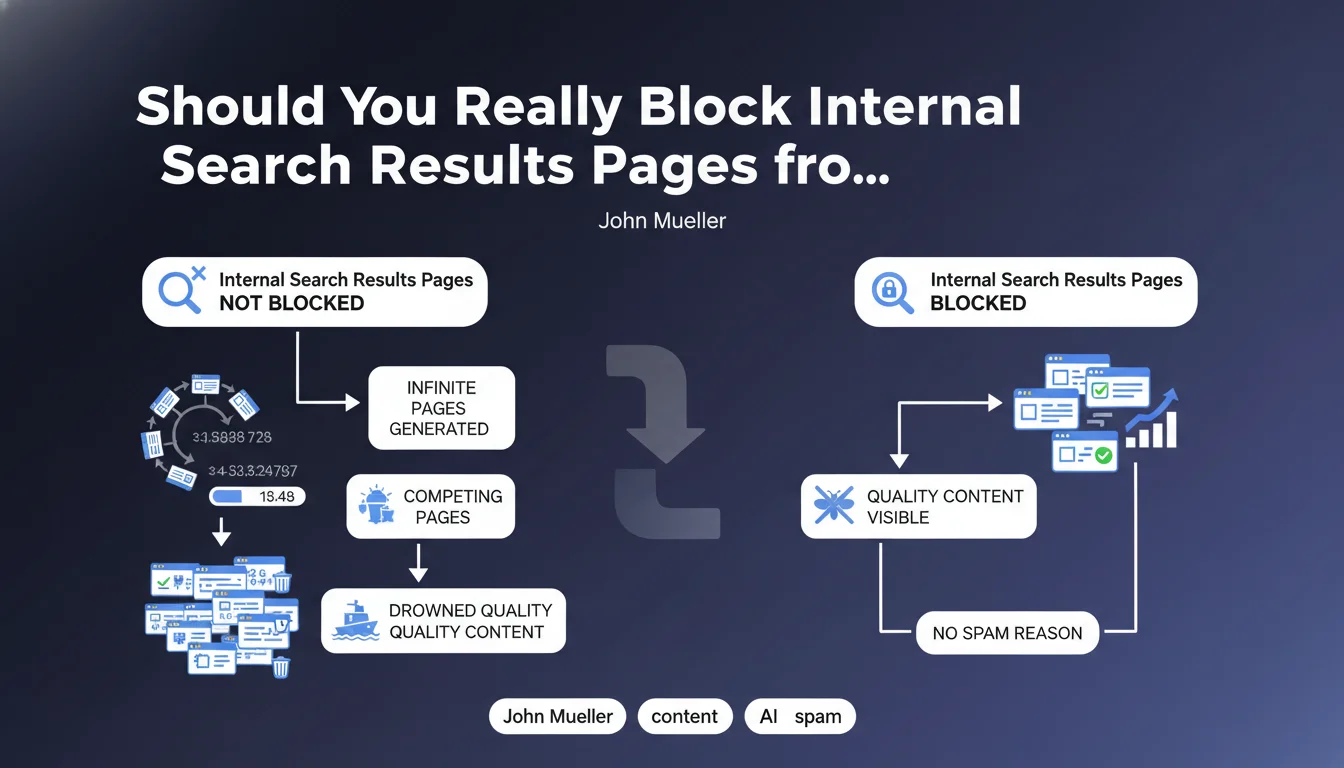
Google considers these pages to pose a content dilution problem. They don't create added value for users coming from search engines, but generate a virtually infinite number of URL variations. The main risk is drowning your quality content pages in a mass of automatically generated pages that cannibalize each other.
How is this different from spam according to Google?
John Mueller explicitly specifies that this is not a spam issue. Google won't penalize your site for this, but these pages create crawl inefficiency.
The search engine will waste time and resources exploring thousands of uninteresting variations. This can reduce the crawl frequency of your truly important pages and negatively impact your overall visibility.
What are the concrete risks for your SEO?
- Crawl budget waste: Googlebot explores useless pages instead of your strategic content
- Internal PageRank dilution: SEO juice disperses across thousands of worthless URLs
- Keyword cannibalization: similar results pages compete with each other
- Inefficient indexing: Google may struggle to identify your priority pages
- Duplicate content: similar results with different parameters create duplicate content
SEO Expert opinion
Does this recommendation apply to all types of sites?
Google's directive is particularly relevant for medium and large-sized sites with an active internal search engine. E-commerce sites, job portals, real estate sites, or content platforms are the first concerned.
For small sites with a basic and rarely used search engine, the impact will be negligible. However, blocking these pages remains a good preventive practice that presents no disadvantages.
Are there cases where indexing can be beneficial?
In rare specific cases, certain results pages may deserve indexing. For example, a page grouping all products from a category via a search can have value if it's properly optimized and offers unique content.
However, these cases should be treated as traditional category pages, with clean URLs, added editorial content, and appropriate canonicalization. They're no longer really classic dynamic results pages.
How does this directive fit into a global SEO strategy?
Blocking internal search results is part of rigorous crawl budget management. It's an element of a broader strategy aimed at effectively guiding robots toward your priority content.
This approach must be consistent with other optimizations: controlled pagination, correctly filtered facets, URL parameters managed via Search Console, and optimized internal link architecture. The overall objective is to maximize the efficiency of each Googlebot visit.
Practical impact and recommendations
How can you effectively block internal search results pages?
The recommended method is to use the robots.txt file to prevent crawling of these URLs. First identify the parameter used by your internal engine (often ?s=, ?search=, ?q=, or ?recherche=).
Then add a directive like: Disallow: /*?s= or Disallow: /search? depending on your configuration. This approach prevents exploration and indexing from the start.
Alternatively, you can use the meta robots noindex tag on these pages, but this requires Googlebot to explore them first. The robots.txt is therefore more efficient for preserving your crawl budget.
What common mistakes should you absolutely avoid?
The most frequent error is blocking too broadly and preventing access to important sections of the site. Test your robots.txt directives thoroughly before production deployment.
Another pitfall: not identifying all parameters used by your search engine. Some sites use multiple URL syntaxes or multiple parameters that must all be blocked.
Finally, be careful not to confuse internal results pages with legitimate category pages. Your site's natural categories must absolutely remain indexable.
How can you verify that your configuration is correct?
- Test your robots.txt file with Google Search Console's testing tool
- Check in Search Console (Coverage section) that no results pages appear in the index
- Analyze your server logs to confirm that Googlebot no longer crawls these URLs
- Use the command site:yourdomain.com inurl:search in Google to detect any indexed pages
- Set up alerts in your analytics tool to monitor organic traffic to these pages
- Document blocked parameters for future site developments
- Conduct a biannual audit to verify that new parameters haven't been introduced
Blocking internal search results pages is a fundamental SEO optimization for any site with a search engine. This measure protects your crawl budget, prevents PageRank dilution, and prevents cannibalization between pages.
Implementation requires precise technical analysis of your architecture and rigorous robots.txt configuration. These technical optimizations, while crucial, can prove complex to implement correctly, especially on large sites with sophisticated architectures. To ensure optimal configuration without risk of error and benefit from a complete audit of your crawl budget, support from a specialized SEO agency can save you valuable time and secure your organic performance in the long term.
💬 Comments (0)
Be the first to comment.