
Official statement
What you need to understand
What Actually Happens When Googlebot Encounters a 500 Error on robots.txt?
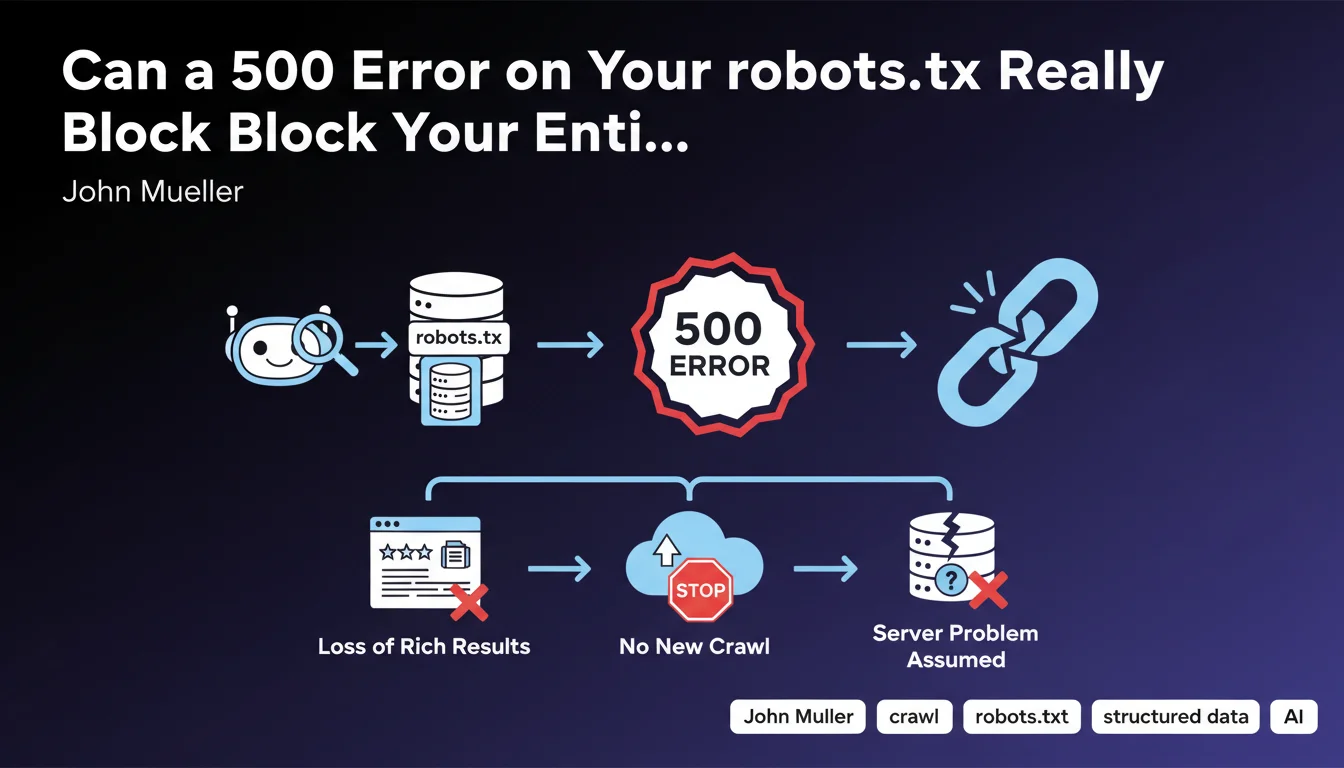
When Googlebot attempts to access a site's robots.txt file and receives a 5xx server error, it interprets this response as a temporary technical problem across the entire server.
Rather than risk crawling the site inappropriately or overloading a potentially failing server, Google adopts a conservative stance: it immediately stops all new crawling of the site. This precautionary measure applies whether the error comes directly from the server or passes through a CDN.
Why Do Rich Results Disappear as Well?
Rich results (rich snippets) like review stars, recipes, or FAQs require regular crawling to be kept up to date in Google's index.
Without access to robots.txt and therefore without new crawling, Google can no longer validate the presence and freshness of structured data. As a precautionary measure, it gradually removes these rich results from display in the SERPs.
What's the Difference Between a 404 Error and a 500 Error for robots.txt?
A 404 error on robots.txt simply means the file doesn't exist, which is interpreted by Google as "no crawl restrictions." The bot can therefore freely explore the site according to its default rules.
A 500 error indicates a server malfunction, which prevents Google from knowing whether or not there are directives to respect. As a precautionary principle, it prefers to suspend crawling rather than violate potential restrictions.
- 404 error: crawl authorized without restrictions (absence of file = no rules)
- 500 error: crawl completely blocked (impossibility of reading potential rules)
- Loss of rich results: direct consequence of crawl stoppage
- CDN impact: the 500 error has the same effect whether it comes from the CDN or the origin server
SEO Expert opinion
Is This Statement Consistent with Field Observations?
This position from Google is perfectly consistent with their philosophy of technical caution. In my 15 years of experience, I have indeed observed drastic crawl drops on sites affected by repeated 5xx errors on their robots.txt.
What is less obvious for many practitioners is the distinction between 404 and 500. Many mistakenly think that an error is an error, whereas Google treats these two HTTP codes in radically opposite ways for robots.txt.
Which Specific Cases Deserve Special Attention?
Configurations with CDN or WAF (Web Application Firewall) are particularly at risk. These intermediary layers can generate 500 errors following timeouts, overly strict security rules, or configuration problems, even if the origin server is functioning correctly.
Sites with complex or distributed infrastructure must also exercise extra vigilance. I've seen cases where robots.txt was served by a different service than the rest of the site, creating unique points of failure.
In Which Scenarios Does This Rule Have the Most Impact?
E-commerce and media sites with thousands of pages and a need for frequent crawling are the most vulnerable. A crawl interruption of a few days can mean unindexed products or missed news.
Sites with a heavy dependence on rich results (recipe sites, review sites, event sites) suffer a double impact: crawl stoppage AND immediate loss of visibility via rich snippets, which can lead to a CTR drop of 30 to 50%.
Practical impact and recommendations
How Can You Verify That Your robots.txt Is Responding Correctly?
The first step is to manually test access to your robots.txt file via several methods. Use your browser, command-line tools like curl, and especially Google Search Console in the "robots.txt Tester" section.
Set up continuous monitoring with monitoring tools (Pingdom, UptimeRobot, or custom scripts) that specifically check the HTTP code returned for /robots.txt. Monitoring every 5-10 minutes is recommended for critical sites.
What Are the Most Common Configuration Errors to Avoid?
The most common error concerns misconfigured CDN settings. Make sure your CDN is configured to serve robots.txt from the origin, or that a version is reliably cached with appropriate fallback rules.
Overly restrictive WAF rules represent another classic trap. Some firewalls block or return 500 errors for suspicious patterns in user-agents, which can affect Googlebot. Test specifically with Google's user-agent.
Avoid dynamic generation of robots.txt without a robust caching mechanism. A static file remains the safest and most efficient option in 90% of cases.
What Should You Concretely Implement to Secure Your Configuration?
- Verify that /robots.txt returns a 200 code if the file exists, or 404 if it doesn't exist (never 500)
- Configure specific monitoring alerts for the robots.txt HTTP code
- Test the configuration with different user-agents, notably Googlebot desktop and mobile
- Document the location and serving method of robots.txt (origin server, CDN, dynamic generation)
- Plan a fallback strategy in case of failure of the system serving robots.txt
- Audit CDN and WAF rules to ensure they don't interfere with robots.txt access
- Implement detailed logs to track all accesses and errors on /robots.txt
- Perform load tests to verify that robots.txt remains accessible even under high traffic
A 500 error on robots.txt has immediate and severe consequences: complete crawl stoppage and loss of rich results. The distinction between 404 codes (acceptable) and 500 (blocking) is crucial.
The solution involves proactive monitoring, rigorous technical configuration, and special attention to intermediary layers (CDN, WAF) that can introduce unexpected failure points.
These technical configurations often involve complex interdependencies between infrastructure, CDN, security, and SEO. For high-stakes sites, it may prove wise to rely on a specialized SEO agency capable of auditing the entire technical chain and implementing a monitoring strategy adapted to your business challenges.
💬 Comments (0)
Be the first to comment.