
Official statement
Other statements from this video 4 ▾
- □ Comment exploiter les tendances de recherche pour anticiper la demande et maximiser son trafic SEO ?
- □ Pourquoi Google Trends recommande-t-il de privilégier les topics aux termes exacts ?
- □ Faut-il espionner les recherches sur vos concurrents pour booster votre stratégie de contenu ?
- □ Faut-il vraiment surveiller les topics émergents dans Google Trends pour anticiper les opportunités SEO ?
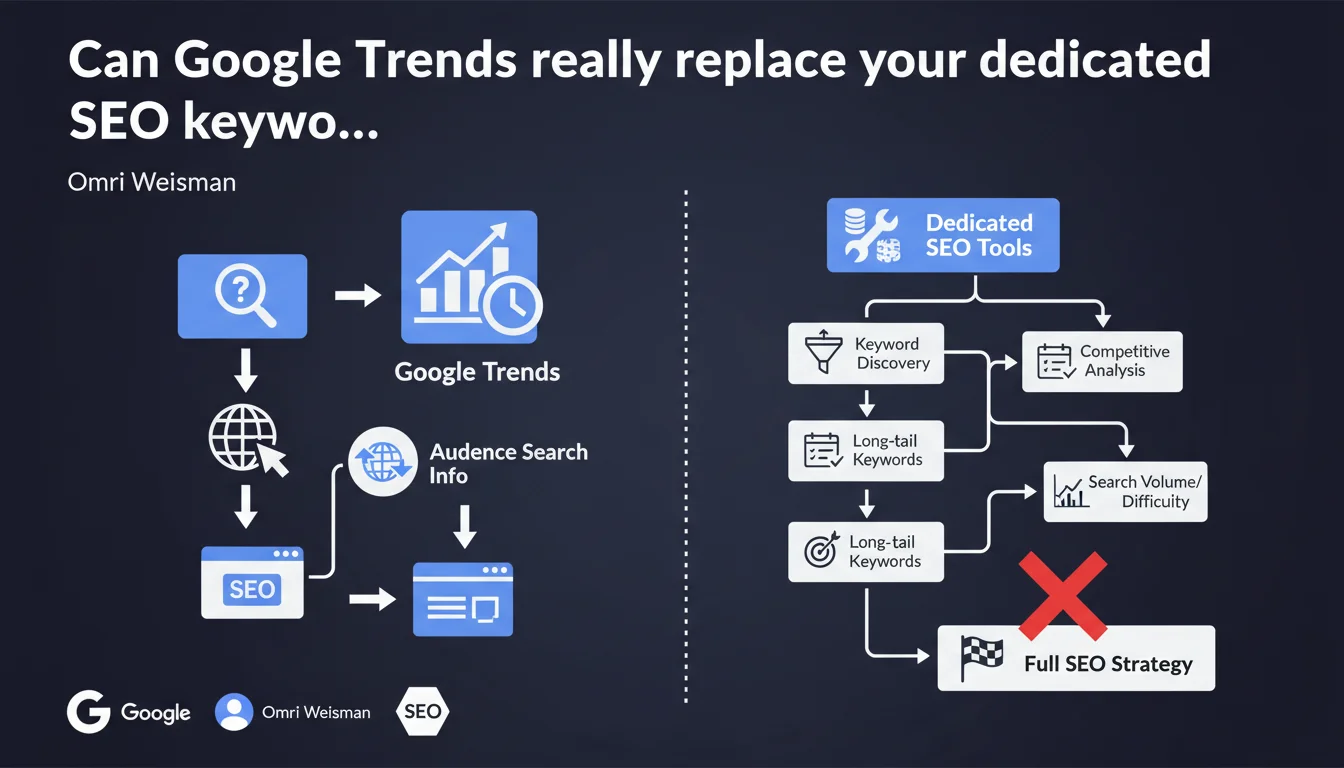
Google has officially validated using Google Trends as an SEO keyword research tool. The statement remains deliberately vague about methodology, but confirms that Google publicly endorses this tool for identifying the terms your audience searches for. It's primarily a reminder that Google Trends can complement your paid tools, not replace them.
What you need to understand
Why is Google pushing Trends for SEO right now?
This positioning is hardly revolutionary — SEO professionals have been using Google Trends for over 10 years. What's changing is that Google is now officially publicly endorsing this SEO use case, whereas the tool was previously positioned as a consumer trend analysis product.
The statement remains unclear on concrete methodology. Google doesn't detail how to cross Trends with other sources, or how to interpret relative data (no absolute volumes provided). Let's be frank: this is surface-level communication.
What's the real value of Trends in an SEO strategy?
Google Trends excels at detecting seasonal variations, comparing relative popularity between multiple terms, and identifying emerging trends. It's useful for adjusting an editorial calendar or anticipating search peaks.
However, the tool provides no absolute search volume, no competitive difficulty data, and no structured long-tail suggestions. For actual actionable keyword research, you need SEMrush, Ahrefs, or at minimum Google Keyword Planner.
What are the limitations Google doesn't mention?
The statement glosses over several critical points. Trends data is sampled and relative, making it unusable for sizing an SEO budget or prioritizing content by real traffic potential.
The tool also suffers from geographic and temporal biases — a trend visible nationally may be invisible locally, and media spikes distort analysis of underlying trends. Finally, Trends only captures searches on Google Search, excluding YouTube, Images, and other Google properties.
- Google Trends is a complementary tool, not a primary keyword research tool
- Data is relative and sampled, with no actionable absolute volumes for planning
- The tool excels at seasonal trends and term comparisons
- It doesn't replace Keyword Planner or paid third-party tools for a complete keyword strategy
- Google remains intentionally vague about concrete usage methodology
SEO Expert opinion
Does this statement really bring anything new to the table?
No. Experienced SEO practitioners have already integrated Trends into their workflow for years. This communication reads more like a marketing repositioning of the tool than a technical revelation.
What's interesting is that Google is officially publicly endorsing Trends for SEO use. This can serve as ammunition to justify strategic decisions with clients or leadership teams skeptical about analyzing search trends. But substantively, there's nothing new.
What nuances should you add to this recommendation?
The main limitation of Trends is its inability to quantify precisely. You can see a term rising, but you can't tell if it's jumping from 10 to 100 monthly searches or from 10,000 to 100,000. For sizing an editorial investment, that's problematic.
Another consideration: Trends data is sensitive to one-off media events. A spike may reflect temporary buzz rather than lasting interest. You need to cross-reference with other sources — actual traffic, Google Search Console, third-party tools — to validate that a trend deserves investment. [To verify]: Google never clarifies how to filter media noise from actionable SEO signal.
When does Trends become genuinely indispensable?
Trends becomes essential for sectors with strong seasonality (e-commerce, tourism, fashion) or for anticipating search peaks tied to recurring events. It's also the ideal tool for spotting emerging opportunities before saturation — but again, you can't quantify real potential.
For existing content audits, Trends helps identify declining terms and decide whether to update or archive pages. This defensive use is often underestimated. But for everything else — long-tail discovery, competitive analysis, content prioritization — third-party tools remain essential.
Practical impact and recommendations
How do you integrate Trends effectively into your SEO workflow?
Start by identifying your sector's core terms — the ones structuring your editorial strategy. Use Trends to compare their relative popularity and detect seasonal variations. This gives you an optimized editorial calendar.
Next, cross-reference these insights with Google Search Console. Identify queries you already rank for, then use Trends to see if they're growing or declining. Adjust your update priorities accordingly.
For new content, use Trends in exploration phase, not final decision phase. Spot emerging trends, then validate their real potential with a tool providing absolute volumes and competitive analysis before greenlight production.
What mistakes should you avoid with Google Trends?
Never base major strategic decisions solely on Trends. Relative data can mislead you — a term showing strong growth might represent only a few hundred monthly searches. Always cross-reference with real volumes.
Also avoid confusing media spike with lasting trend. One-off events (scandal, viral moment) create dramatic Trends spikes, but traffic collapses within days. Filter these anomalies by analyzing history over months or even years.
Finally, remember that Trends only covers Google Search. If your audience heavily uses YouTube, Instagram, or TikTok for information discovery, you're missing part of the picture. Supplement with platform-specific tools.
What checklist should you follow to leverage Trends correctly?
- Identify your core terms and compare their relative popularity on Trends
- Cross-reference detected trends with Google Search Console to validate relevance to your actual traffic
- Use Trends to detect seasonal variations and adjust your editorial calendar
- Never validate a term on Trends alone — cross-reference with absolute volumes (Keyword Planner, third-party tools)
- Filter one-off media spikes by analyzing history over several months
- Monitor emerging trends to spot opportunities before saturation
- Review your existing content declining in search visibility — update or archive as needed
- Supplement Trends data with YouTube, Images, Shopping insights relevant to your sector
❓ Frequently Asked Questions
Google Trends fournit-il des volumes de recherche absolus ?
Peut-on remplacer Ahrefs ou SEMrush par Google Trends ?
Comment filtrer les pics médiatiques ponctuels sur Trends ?
Google Trends couvre-t-il YouTube et Google Images ?
Quelle est la fiabilité des données de Google Trends ?
🎥 From the same video 4
Other SEO insights extracted from this same Google Search Central video · published on 10/10/2024
🎥 Watch the full video on YouTube →
💬 Comments (0)
Be the first to comment.