
Official statement
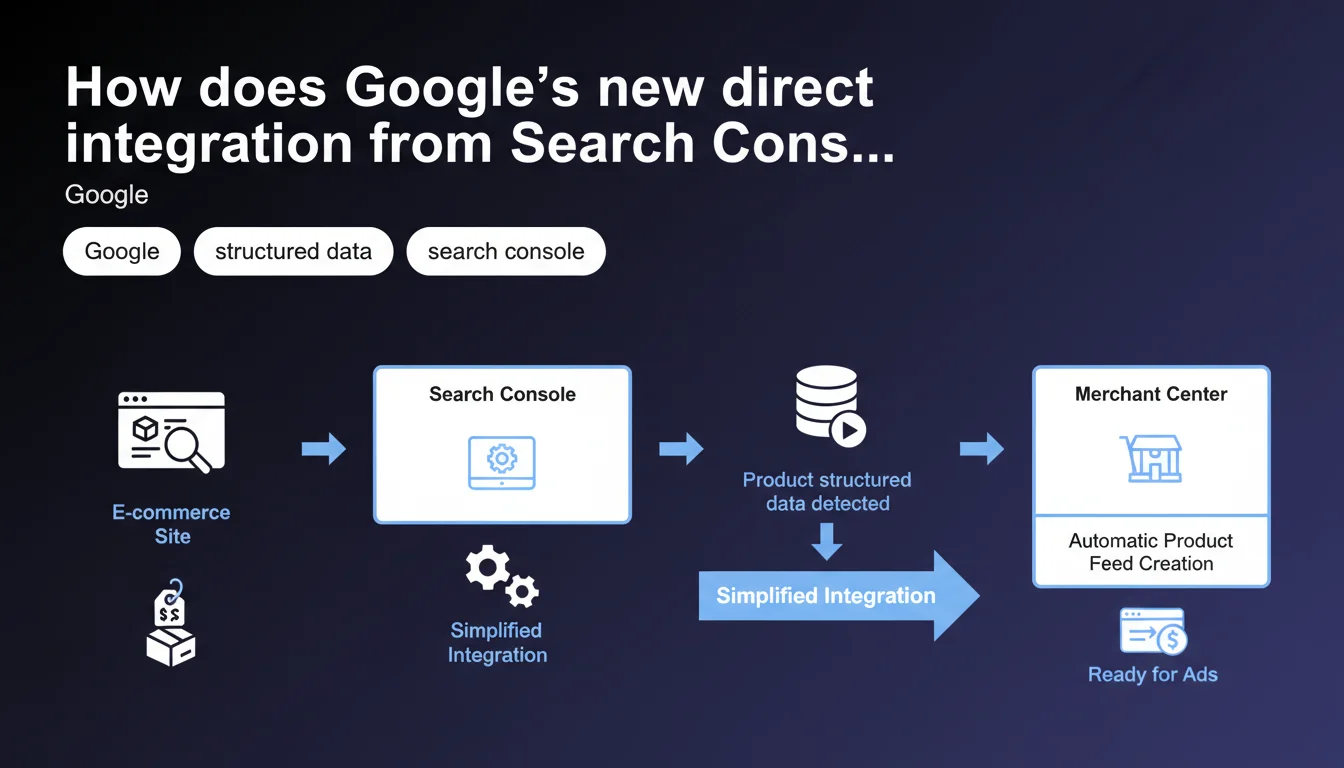
Google has launched a direct integration between Search Console and Merchant Center for e-commerce sites using Product structured data. The process automatically creates a product feed from your already-marked pages, eliminating the typical technical complexity of manual feeds.
What you need to understand
What exactly changes with this integration?
Until now, syncing an e-commerce catalog with Google Merchant Center required manually creating an XML or CSV feed — a process that was often tedious and required technical expertise. Integration from Search Console automatically detects pages already marked with Product structured data and generates the feed without any intervention.
This approach relies on one simple prerequisite: your product pages must already use schema.org/Product markup correctly implemented. If that's the case, Google retrieves the information directly from your crawled pages.
Why is Google introducing this simplification now?
The answer comes down to two main points. First: reducing technical friction for small e-commerce businesses that don't necessarily have the resources to maintain a dynamic product feed. Second — and this is where it gets interesting — encouraging the use of structured data by giving it immediate operational value beyond just appearing in search results.
Essentially, Google is creating a virtuous cycle: the better you mark up your products, the more easily you appear in Shopping results. And incidentally, the more structured data Google has to feed its commercial surfaces.
What are the requirements to take advantage of this?
Access to this feature requires three basic elements:
- A verified site in Search Console with indexed product pages
- Correctly implemented Product structured data (name, image, price, availability minimum)
- Compliance with Merchant Center policies — no prohibited products, compliant information, etc.
- No critical errors in the Search Console Products report
If these criteria are met, Google will offer the integration directly from the Search Console interface, in the section dedicated to products.
SEO Expert opinion
Is this automation really an advantage compared to a traditional feed?
Let's be honest: for a site with 50 product SKUs, it's a real time saver. But as soon as you're dealing with large catalogs or frequent stock updates, the automatic feed from crawling has structural limitations. Data freshness depends on crawl frequency, which can vary dramatically depending on your crawl budget.
A dynamic XML feed updated in real-time remains technically superior for managing stock outs, price variations, or flash promotions. The Search Console integration is best suited for relatively stable catalogs with update cycles compatible with Google's crawl pace.
What about the quality of automatically extracted data?
Here we touch on a sensitive point. Google extracts what it finds in your structured data markup — nothing more, nothing less. If your markup lacks precision (truncated descriptions, missing optional attributes, poor quality images), your feed will inherit these weaknesses.
Unlike a manual feed where you control each field, here you're delegating to Google the interpretation of your markup. [To be verified]: we still lack field feedback on handling complex product variants (sizes, colors) or specific attributes like GTINs in this automatic mode.
Does this announcement hide a desire for greater control over e-commerce data?
It's hard not to see the strategic move. By facilitating Merchant Center access, Google ensures that more catalogs feed its Shopping surfaces — including the free listings it has deployed in recent years. More product data equals greater relevance for its commercial results.
From an SEO perspective, it also strengthens the importance of structured data as a quality signal. A site that implements them correctly becomes mechanically more visible across Google's ecosystem, both traditional SERPs and Shopping results.
Practical impact and recommendations
What do you actually need to do to enable this integration?
First step: audit your existing Product markup. Log into Search Console, Products section, and verify there are no critical errors. Google clearly indicates pages with structured data problems.
If everything looks good, the Merchant Center integration option will appear in the interface. Follow the guided process — it will ask you to confirm your Merchant Center account (or create one) and validate feed parameters.
What common mistakes should you absolutely avoid?
Mistake number one: enabling integration without fixing markup problems first. If Search Console reports missing prices, invalid images, or duplicate URLs, Merchant Center will inherit these defects and reject some of your products.
Second classic pitfall: forgetting that the automatic feed doesn't replace legal obligations. Gross prices, shipping costs, delivery times — everything must comply with Merchant Center policies, whether the feed is manual or automatic.
- Verify that all your product pages include required fields: name, image, price, availability
- Check consistency between prices displayed on pages and those extracted by structured data
- Test markup with the Rich Results testing tool before activation
- Ensure canonical URLs point to main product pages (not parameter variations)
- Monitor crawl frequency of your product pages to anticipate feed update delays
How do you ensure the feed stays up-to-date and performing well?
Once integration is active, regularly monitor your Merchant Center reports to catch rejections or warnings. Unlike a manual feed you can fix in real-time, here corrections go through your pages — so crawling, indexing, then feed propagation.
For sites with short product lifecycles or frequent variations, consider combining this method with a complementary XML feed for strategic products requiring immediate updates.
❓ Frequently Asked Questions
Puis-je utiliser à la fois un flux XML classique et l'intégration automatique depuis Search Console ?
À quelle fréquence le flux automatique se met-il à jour ?
Que se passe-t-il si mes données structurées contiennent des erreurs après activation ?
Cette méthode fonctionne-t-elle pour tous les types de produits ?
Dois-je avoir un compte Merchant Center existant avant d'utiliser cette intégration ?
🎥 From the same video 2
Other SEO insights extracted from this same Google Search Central video · published on 07/12/2022
🎥 Watch the full video on YouTube →
💬 Comments (0)
Be the first to comment.