
Official statement
What you need to understand
What is the info: command and what is it used for?
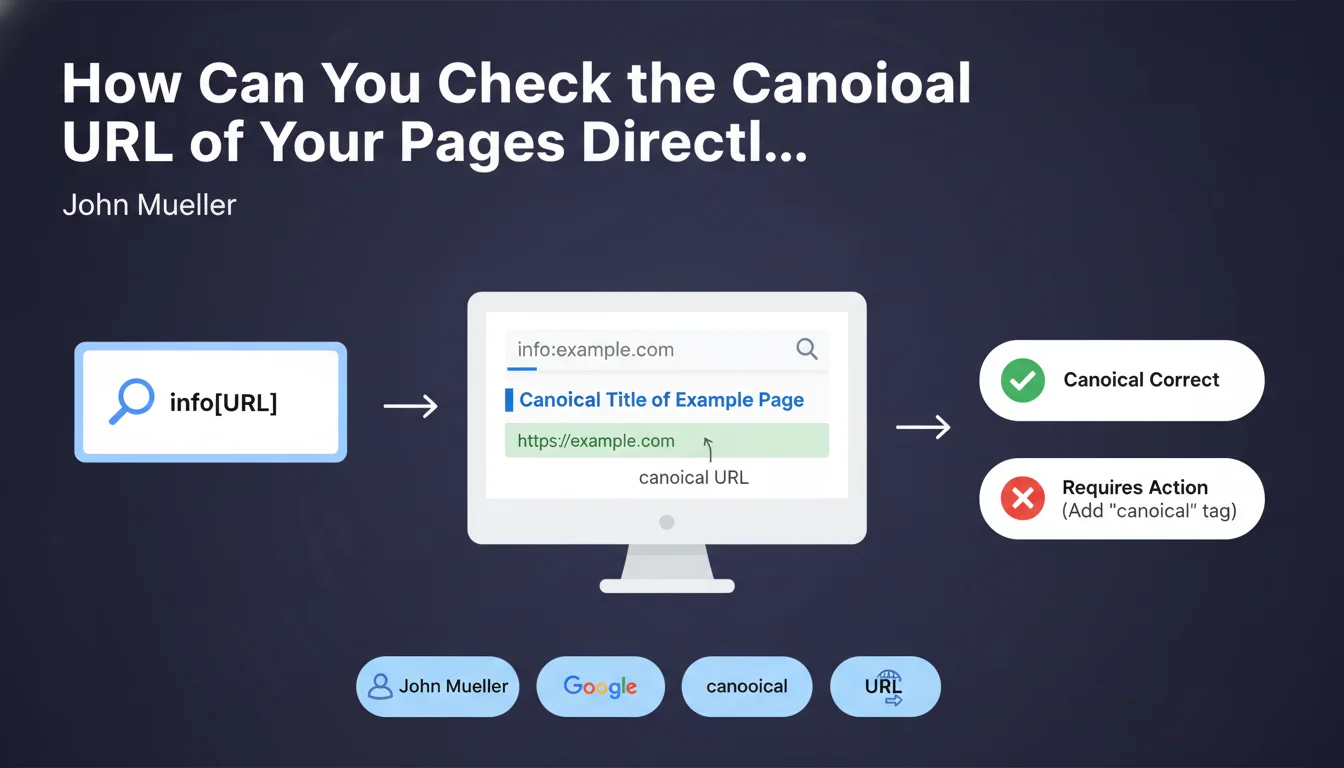
The info:[URL] syntax is a little-known advanced search command that allows you to directly query Google about the canonical version of a page. When you type this command into the search engine, Google returns the URL that it considers to be the official version of that page in its index.
This feature is particularly useful for verifying whether Google is properly respecting your canonicalization directives. It provides direct feedback from the search engine on its actual perception of your URL structure, without going through third-party tools.
Why is it important to know the canonical URL identified by Google?
Google may ignore your canonical tags if they are poorly implemented or contradict other signals. The info: command allows you to quickly detect these disagreements between your intentions and the search engine's interpretation.
Knowing the actual canonical URL helps identify duplicate content issues, link equity consolidation problems, and prevents the dilution of your authority across multiple versions of the same page.
What are the practical use cases for this command?
- Verify that Google respects your self-referencing canonical tags or those pointing to other pages
- Detect duplication issues related to URL parameters, HTTP/HTTPS versions, www/non-www
- Control canonicalization on paginated, filtered, or faceted pages
- Identify situations where Google chooses a different URL from the one you defined
- Quickly audit the canonicalization status without going through Search Console
SEO Expert opinion
Is this method reliable for all scenarios?
The info: command remains a quick diagnostic tool but has certain limitations. It doesn't always work consistently, particularly on new sites or freshly indexed pages where Google hasn't yet fully stabilized its choice.
It's important to note that this command is being progressively phased out by Google in favor of Search Console. In some cases, it may return no results or incomplete information, particularly on complex URLs with numerous parameters.
What precautions should be taken when interpreting the results?
The absence of results doesn't necessarily mean the page isn't indexed. It may simply indicate that Google hasn't clearly established a canonical version or that the command doesn't work for that specific URL.
You must also understand that Google uses multiple signals to determine the canonical URL: canonical tags, redirects, internal links, sitemaps, site structure. The info: command doesn't explain why Google made this choice, only what the final result is.
In which contexts does this technique provide the most value?
This command is particularly useful during quick diagnostics or exploratory audits. It allows you to get a first impression without logging into Search Console, especially for analyzing competitor sites.
For your own sites, always prioritize Search Console as your primary source, but use info: as a complementary verification or for quick spot checks. It's also a good educational tool for concretely understanding how Google interprets canonicalization signals.
Practical impact and recommendations
How can you concretely use the info: command in your SEO workflow?
To use this command, simply type info:https://yoursite.com/your-page in the Google search bar. Examine the URL displayed in the result: if it matches your expectation, your canonicalization is working correctly.
Integrate this check into your regular audit processes, particularly after significant technical changes: HTTPS migration, URL structure changes, site redesign, or implementation of new canonicalization rules.
What mistakes should you avoid when analyzing canonical URLs?
Don't panic if the canonical URL differs slightly from your tested URL on minor details like parameter order. Google may normalize certain elements without this being problematic.
Avoid multiplying contradictory signals: if your canonical tag points to URL A, but your internal links massively point to URL B, Google may choose B. Consistency is essential.
Never use this command as your sole source of truth. Data may be out of sync or incomplete, hence the importance of cross-referencing with other sources.
What should you check and correct as a priority?
- Systematically test important URL variations: HTTP vs HTTPS, www vs non-www, trailing slash vs without trailing slash
- Verify that your self-referencing canonical tags are properly respected by Google on your strategic pages
- Check pages with tracking or session parameters to ensure they point to the clean version
- Audit category pages with filters or pagination to confirm proper canonicalization
- Document cases where Google chooses a different URL from the one indicated and analyze the reasons
- Compare the results of the info: command with Search Console data to identify inconsistencies
- Prioritize corrections on high-traffic or high-commercial-value pages where canonicalization is incorrect
- Set up regular monitoring, particularly after technical modifications to the site
💬 Comments (0)
Be the first to comment.