
Official statement
What you need to understand
Why Does Google Now Recommend Responsive Over Dedicated Mobile Sites?
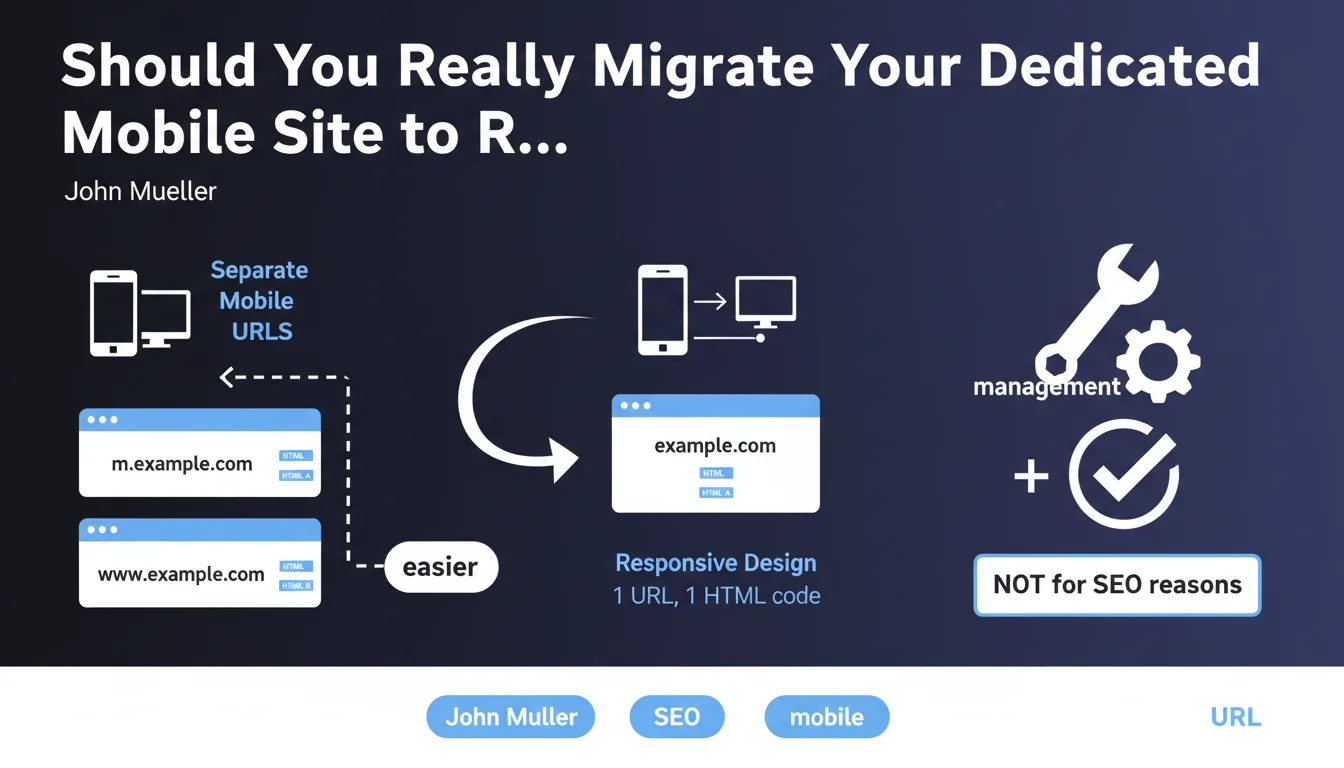
Google has evolved its position over the years regarding different mobile-first approaches. Initially neutral between the three options (dedicated site, responsive, dynamic serving), the search engine now displays a clear preference for responsive design.
The reason given by Google is not algorithmic but pragmatic: managing a site with a single URL and a single HTML code is much simpler. Dedicated mobile sites (m.mysite.com) multiply sources of errors and maintenance burden.
What Are the Technical Differences Between These Mobile Approaches?
A dedicated mobile site uses separate URLs (example: m.mysite.com) with specific HTML code for mobile. This approach requires redirects and constant synchronization between versions.
Responsive design relies on a single URL and unique HTML code that automatically adapts to all screens. Dynamic serving uses a single URL but serves different HTML depending on the detected device.
- Responsive drastically simplifies technical and editorial management
- Dedicated mobile sites require double maintenance and rel=alternate/canonical tags
- Configuration errors on dedicated sites can cause major indexing problems
- Google now indexes in mobile-first, making responsive naturally aligned with this logic
Does This Recommendation Have a Direct Impact on SEO Rankings?
Google states that this recommendation is not motivated by ranking criteria. Technically, a properly configured dedicated mobile site can achieve the same SEO performance as a responsive site.
However, the increased complexity of dedicated mobile sites statistically increases the risk of technical errors: redirect problems, duplicate content, inconsistencies between versions. These errors directly impact SEO.
SEO Expert opinion
Is This Statement Consistent With Practices Observed in the Field?
Absolutely. Observation of thousands of sites shows that dedicated mobile architectures do indeed generate more technical problems. Configuration errors in canonical/alternate tags are frequent and penalize indexing.
Responsive sites dominate today's professional web for a simple reason: they reduce technical debt. With generalized mobile-first indexing, maintaining two separate versions of a site no longer makes strategic sense.
What Nuances Should Be Added to Google's Recommendation?
If your dedicated mobile site works perfectly and generates good results, there is no absolute urgency to migrate. Google will continue to support this configuration, even though it is considered legacy.
Migration to responsive should be considered during a natural site redesign or when recurring technical problems appear. A poorly prepared migration can cause more damage than benefits.
In Which Exceptional Cases Does a Dedicated Mobile Site Remain Relevant?
Certain very specific contexts can still justify a dedicated mobile site. Complex web applications with radically different functionalities between desktop and mobile are one example.
Nevertheless, even in these cases, modern JavaScript frameworks (React, Vue) today allow managing this complexity in responsive. Genuine technical justifications for a dedicated site are becoming rare.
Practical impact and recommendations
What Should You Do Concretely If You Have a Dedicated Mobile Site?
Start with an audit of your current configuration. Verify that your rel=alternate and rel=canonical tags are properly implemented and that your redirects work without errors.
Then evaluate the cost-benefit of migration. If your dedicated mobile site regularly generates technical problems or requires heavy maintenance, migration becomes a priority.
Plan this migration as a standalone project: choice of responsive framework, CSS redesign, cross-device testing, redirect plan, post-migration monitoring. Never underestimate the complexity of this undertaking.
How Can You Successfully Migrate to Responsive Design?
The key to a successful migration lies in methodical preparation. First create a development environment where you will exhaustively test the new design on all devices and browsers.
Implement a rigorous 301 redirect plan from all your mobile URLs to the unique responsive URLs. Maintain the existing desktop URL structure to minimize SEO disruption.
- Audit your current mobile configuration and identify all existing problems
- Document all your mobile and desktop URLs for redirect mapping
- Choose a responsive framework suited to your needs (Bootstrap, Foundation, custom)
- Optimize mobile performance: responsive images, lazy loading, critical CSS
- Test rendering on as many real devices as possible (not just emulation)
- Configure your 301 redirects and test them exhaustively before going live
- Monitor Search Console for 2-3 months post-migration to detect indexing errors
- Verify that your Core Web Vitals remain in green zones after migration
- Update your XML sitemap and submit it to Google Search Console
What Pitfalls Should You Avoid During This Transition?
The first pitfall is neglecting mobile performance. A poorly optimized responsive site will be slower than a lightweight dedicated mobile site. Watch out for CSS/JS resource weight and non-optimized images.
The second pitfall concerns redirects. Forgetting to redirect certain mobile URLs or creating multiple redirect chains will penalize your SEO. Test each URL individually.
💬 Comments (0)
Be the first to comment.