
Official statement
What you need to understand
What Happens When a Body Tag Ends Up in the Head?
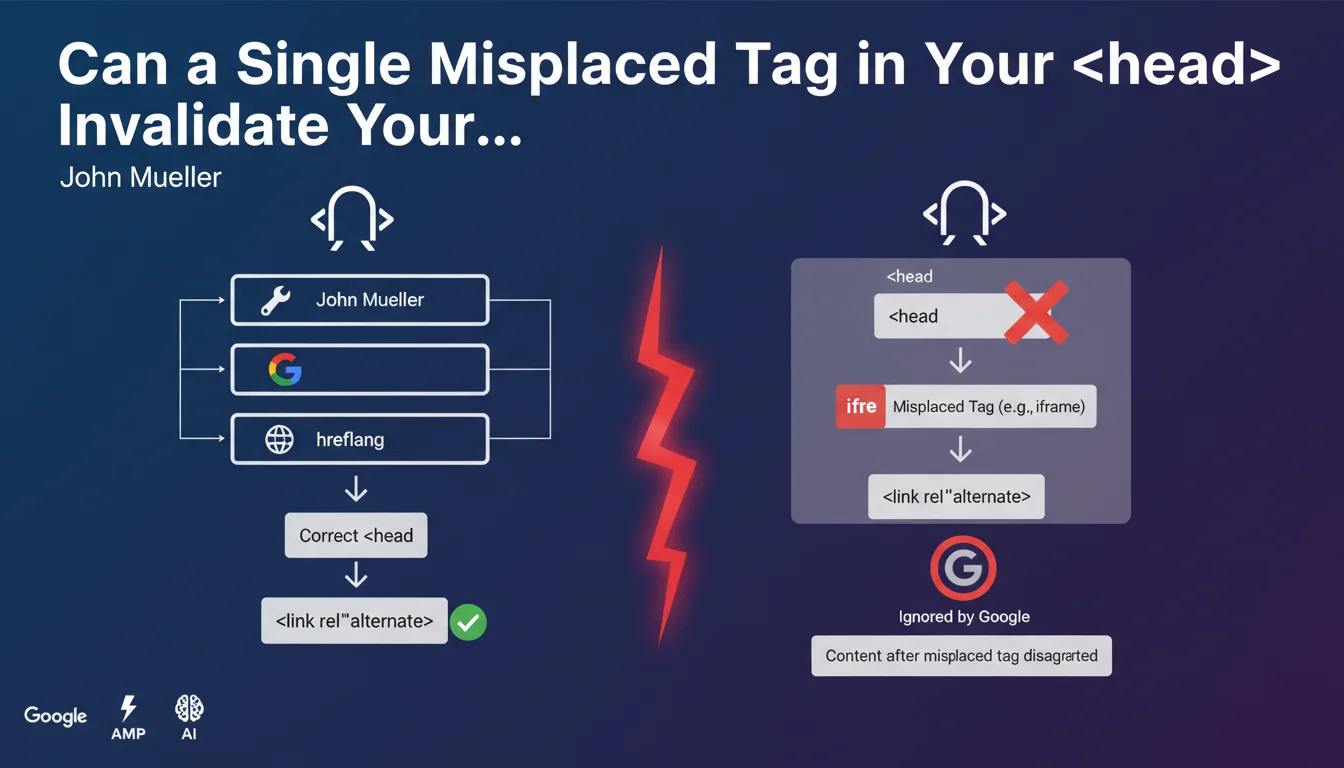
When a tag intended for the body of the page (such as <div>, <iframe>, or <img>) is placed in the <head> section, it causes an implicit closure of this area by the browser and Googlebot.
This automatic closure means that all subsequent tags in the <head> are ignored or moved in the DOM. Google therefore no longer processes them as valid <head> directives.
Which Tags Are Affected by This Problem?
Critical SEO tags that can be affected include: hreflang, canonical, alternate, certain structured metadata, and even meta robots tags if they are placed after the problematic element.
Tags that should never be in the <head> and cause this closure include: <div>, <span>, <iframe>, <img>, <p>, and generally any visible content element.
Why Is This Rule So Important for SEO?
A poorly recognized hreflang tag can lead to faulty geographic targeting, an ignored canonical tag generates duplicate content, and missing metadata affects indexing.
- The HTML structure must strictly comply with W3C standards
- A single misplaced tag can invalidate the entire rest of the
<head> - Google follows HTML parsing rules like browsers do
- This problem is invisible in appearance but critical for SEO
- HTML validation tools generally detect these errors
SEO Expert opinion
Is This Statement Consistent with Real-World Observations?
Absolutely. In 15 years of experience, I have encountered numerous cases where hreflang or canonical tags were technically present in the source code but completely ignored by Google Search Console.
John Mueller's explanation confirms what technical audits regularly reveal: the problem often comes from head contamination by body elements, usually added by plugins, misconfigured tag managers, or defective templates.
What Nuances Should Be Added to This Rule?
It's important to understand that Google doesn't arbitrarily "decide" to ignore these tags. It's the HTML parser itself that restructures the DOM according to HTML5 specifications.
Modern browsers apply automatic correction rules: when they encounter a content tag in the <head>, they implicitly close this section and open the <body>. Googlebot adopts the same behavior.
<head> after initial loading.In Which Cases Does This Rule Pose the Most Problems?
Multilingual sites are particularly vulnerable because they heavily depend on hreflang tags. A single misplaced <iframe> tag (cookie banner, for example) can destroy an entire internationalization strategy.
Sites using numerous third-party scripts (advertising, tracking, chat) are also at high risk, as these tools sometimes inject code without respecting HTML structure. Poorly coded WordPress themes also represent a frequent source of this problem.
Practical impact and recommendations
How Can I Verify That My Site Is Compliant?
Use the W3C validator (validator.w3.org) which will immediately flag any misplaced tag. Also inspect the rendered DOM via Chrome DevTools (F12) to compare with your source code.
In Google Search Console, monitor hreflang error reports and canonical tag warnings. An abnormally high error rate may indicate this structural problem.
What Corrective Actions Should Be Implemented Immediately?
- Audit the source code of your main templates (header.php, header.twig, etc.)
- Identify all third-party scripts and verify their injection point in the DOM
- Place critical SEO tags (canonical, hreflang, meta robots) as early as possible in the
<head> - Move all visual elements (iframes, divs, images) to the
<body> - Configure tag managers to only inject authorized scripts in the
<head> - Systematically test after each plugin addition or template modification
- Implement automated HTML validation in your deployment process
What If Your Technical Infrastructure Is Complex?
On large-scale sites or complex architectures (multilingual sites, e-commerce platforms), these verifications and corrections can prove particularly delicate. Interactions between templates, plugins, and third-party scripts create dependencies that are difficult to anticipate.
The risks of side effects are real when making structural code modifications. In this context, engaging a specialized SEO agency with advanced technical expertise provides personalized support, comprehensive auditing, and fixes tailored to your specific environment, while preserving your site's stability.
<head> causes its implicit closure and invalidates all subsequent SEO tags. Systematically validate your HTML, place your critical tags at the beginning of the <head>, and regularly audit third-party script injections. This structural compliance is an invisible but fundamental prerequisite for Google to take your SEO directives into account.
💬 Comments (0)
Be the first to comment.