
Official statement
What you need to understand
Why Do "Coming Soon" Pages Cause Problems During a Migration?
"Coming Soon" pages are often used during a redesign to inform visitors that the site is temporarily unavailable. However, Google recommends avoiding this approach because it creates ambiguity for search engines.
These intermediary pages typically generate an HTTP 200 status code, signaling to Googlebot that the content is available and final. The bot then indexes a temporary page instead of understanding that it's maintenance, which can negatively impact your organic search rankings.
What HTTP Status Code Should You Use During a Short Migration?
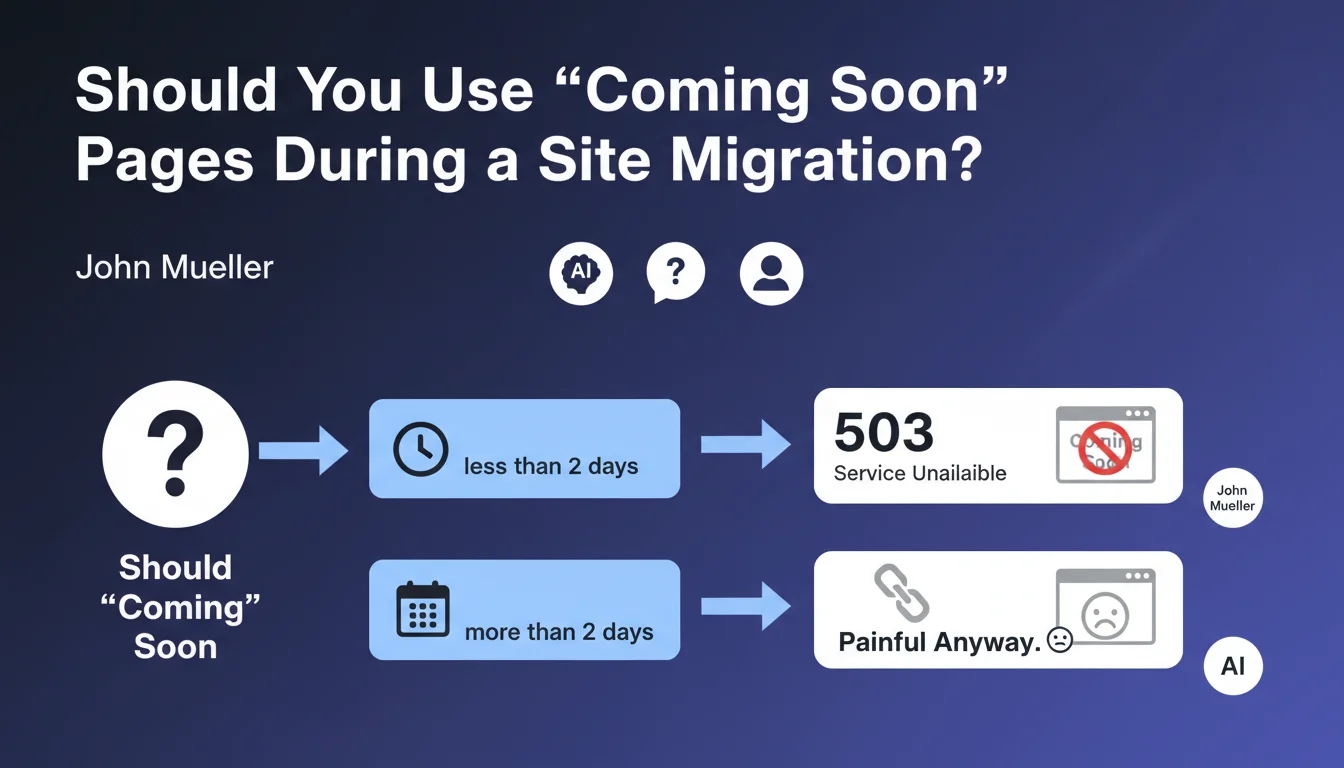
For a migration of less than 2 days, Google recommends using a 503 (Service Unavailable) status code. This code explicitly indicates that the server is temporarily unavailable for maintenance.
The 503 has the advantage of preserving your existing indexation. Googlebot understands that it's a temporary interruption and doesn't index new content during this period.
How Can You Optimize Communication with Googlebot During Maintenance?
The Retry-After directive in the HTTP header allows you to precisely tell Googlebot when to come back and crawl the site. This optimization avoids unnecessary crawl attempts during the maintenance period.
However, for long migrations (more than 2 days), even these best practices aren't enough to avoid a negative impact. In this case, the presence or absence of a "Coming Soon" page becomes secondary compared to the consequences of prolonged unavailability.
- The 503 code is preferable to 200 for short maintenance periods
- The Retry-After directive optimizes Googlebot's crawl
- Migrations should be as brief as possible (ideally less than 2 days)
- Long unavailability will impact SEO regardless of the strategy
SEO Expert opinion
Is This Recommendation Consistent with Practices Observed in the Field?
This statement aligns perfectly with the empirical observations of SEO professionals. Sites that correctly use the 503 code during short maintenance periods generally recover their rankings quickly.
Conversely, sites displaying "Coming Soon" pages with a 200 code frequently experience an erosion of their organic traffic. Google indexes these temporary pages, creating a period of confusion that can persist for several weeks after the migration ends.
What Nuances Should Be Applied to This Directive?
The "2 days" limit mentioned is not an absolute rule set in stone. It's more of an indicative threshold beyond which SEO risks increase significantly.
For sites with high authority and substantial crawl budget, a 3-4 day maintenance with a properly configured 503 can be tolerable. Conversely, for a new site or one with low authority, even 48 hours can have measurable consequences.
In What Cases Does This Approach Require Adaptations?
For e-commerce sites or critical platforms, a complete interruption is often not feasible. In these situations, a progressive migration by site sections is preferable to a global 503.
International sites can also benefit from a country-by-country or language-by-language approach, allowing them to maintain part of the traffic active during the migration of other sections. This complex strategy requires rigorous planning and excellent technical mastery.
Practical impact and recommendations
How Do You Technically Prepare a Migration to Minimize SEO Impact?
The first step is to plan a migration window as short as possible, ideally during low-traffic periods. Document each technical step precisely to avoid surprises.
Configure your server to return a 503 code with the Retry-After header properly set. Test this configuration on a staging environment before production deployment.
Also prepare a rollback plan to quickly revert to the old version in case of a major problem. This safety net allows you to limit the actual unavailability duration.
What Critical Mistakes Must You Absolutely Avoid?
The most frequent error is creating a "Coming Soon" page that returns a 200 code instead of a 503. This configuration tells Google that your site is voluntarily displaying this thin content.
Another pitfall: forgetting to monitor Googlebot's behavior during and after the migration. Regularly consult Google Search Console to detect any crawl anomalies.
How Do You Verify That Your Configuration Is Correct?
Use HTTP testing tools like curl or browser extensions to verify that your pages are returning the 503 code during maintenance. Also check the presence and value of the Retry-After header.
After the migration, analyze the coverage reports in Google Search Console to ensure that no temporary pages were indexed by mistake. Also monitor the evolution of your organic traffic over the following 2-3 weeks.
- Plan a migration of less than 48 hours if possible
- Configure a 503 status code (not 200, not 404)
- Add the Retry-After header with a realistic value
- Test the configuration on a staging environment
- Prepare a rollback plan in case of problems
- Absolutely avoid "Coming Soon" pages with 200 code
- Verify status codes with appropriate tools
- Monitor Google Search Console during and after migration
- Check that all codes return to normal after migration
- Analyze organic traffic evolution over 2-3 weeks
💬 Comments (0)
Be the first to comment.